PUBG Update 42.2 Adds a Full Beginner Course, Solo Deathmatch, and Console Graphics Choices
The update introduces a 17-chapter Basic Training course, a new FPP solo mode, map changes, expanded radial menus, and scheduled maintenance on July 15 for PC and July 23 for consoles.

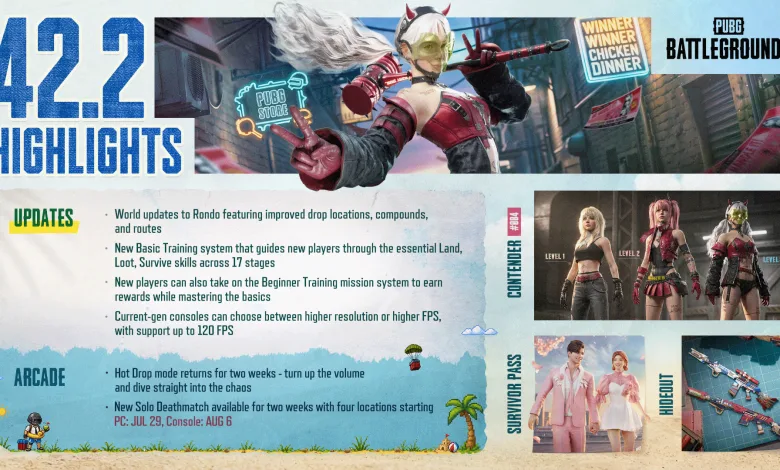
PUBG: BATTLEGROUNDS Update 42.2 brings a large onboarding overhaul, new arcade modes, map changes, expanded communication tools, and console graphics options. PUBG Corp. published the full notes on July 14, while the update itself is scheduled to arrive after platform maintenance on separate dates.
PC maintenance is scheduled for July 15 from 00:00 to 08:30 UTC. Console maintenance is scheduled for July 23 from 01:00 to 09:00 UTC, and the listed times may change. The complete announcement is available in the official Update 42.2 notes.
There is a lot packed into this update. New players receive a guided path through PUBG’s core systems, while experienced players get a new solo-focused arcade mode, map adjustments, control changes, and quicker ways to communicate with teammates.
PC players who want a broader look at the console-focused work can also find more context in the console roadmap details.
Update 42.2 at a glance
- A 17-chapter Basic Training course now teaches new players through guided objectives and an NPC partner.
- Beginner Training adds daily missions and rewards for all players.
- Console players receive Resolution Priority and Framerate Priority graphics modes.
- Rondo and Taego receive area and item-pool changes.
- Hot Drop Mode returns to Arcade.
- Solo Deathmatch introduces short FPP rounds on three compact map locations.
- World Map tabs, radio messages, markers, and radial menus receive broad changes.
- A new Contender called Glasya arrives with a special Execution Move.
Patch Notes: Update 42.2
Update 42.2 focuses on three major areas: bringing new players up to speed, giving console players more control over performance, and adding faster combat options through Arcade. The patch also makes team communication easier by reorganizing the World Map, Message Radial, inventory markers, and controller inputs.
Live Maintenance Schedule (UTC)
The maintenance schedule is subject to change.
- PC: 2026/07/15, 00:00 – 08:30
- Console: 2026/07/23, 01:00 – 09:00
Basic Training Revamp
A step-by-step Basic Training has been added for beginners. The course is built around 17 chapters, each with checklist objectives. An NPC partner joins the player, offering voice guidance and Radio Message assistance during the lessons.
- You can enter the Basic Training the same way as before, via Play → Training → Basic Training
- In each chapter, an NPC partner will play alongside you, providing voice and radio message guidance and helping you complete your objectives
- The tutorial consists of 17 chapters. Complete every checklist item in a chapter to advance to the next one. If you are eliminated during a chapter, you will restart that chapter from the beginning
- Upon clearing each chapter, you will receive a total score based on your checklist results, which determines your Clear Rank (B/A/S/S+)
- When you return to the Lobby after completing a chapter, rewards will be granted based on your Clear Rank
The chapters cover movement, parachute landings, weapons, looting, the Blue Zone, armor, healing, communication, care packages, reviving, Blue Chips, vehicles, and team recalls. The course takes about 10 minutes to complete, according to the developer’s notes.
| Chapter | Training |
|---|---|
| 1 | Basic movement controls |
| 2 | Boarding the plane and landing by parachute |
| 3 | Obtaining a weapon and ammo, reloading, shoulder aiming, aiming down sights, and firing |
| 4 | Shooting and eliminating enemies (1st) |
| 5 | Looting a death box and equipping attachments |
| 6 | Shooting and eliminating enemies (2nd) |
| 7 | Avoiding the Blue Zone |
| 8 | Using throwables |
| 9 | Equipping armor |
| 10 | Using healing and boost items |
| 11 | Communicating with Radio Messages |
| 12 | Securing supplies from a care package and equipping a weapon |
| 13 | Shooting and eliminating enemies (3rd) |
| 14 | Reviving a teammate |
| 15 | Retrieving a Blue Chip |
| 16 | Driving a vehicle and recalling a teammate at the Blue Chip Tower |
| 17 | Shooting and eliminating enemies (4th) |
Beginner Training
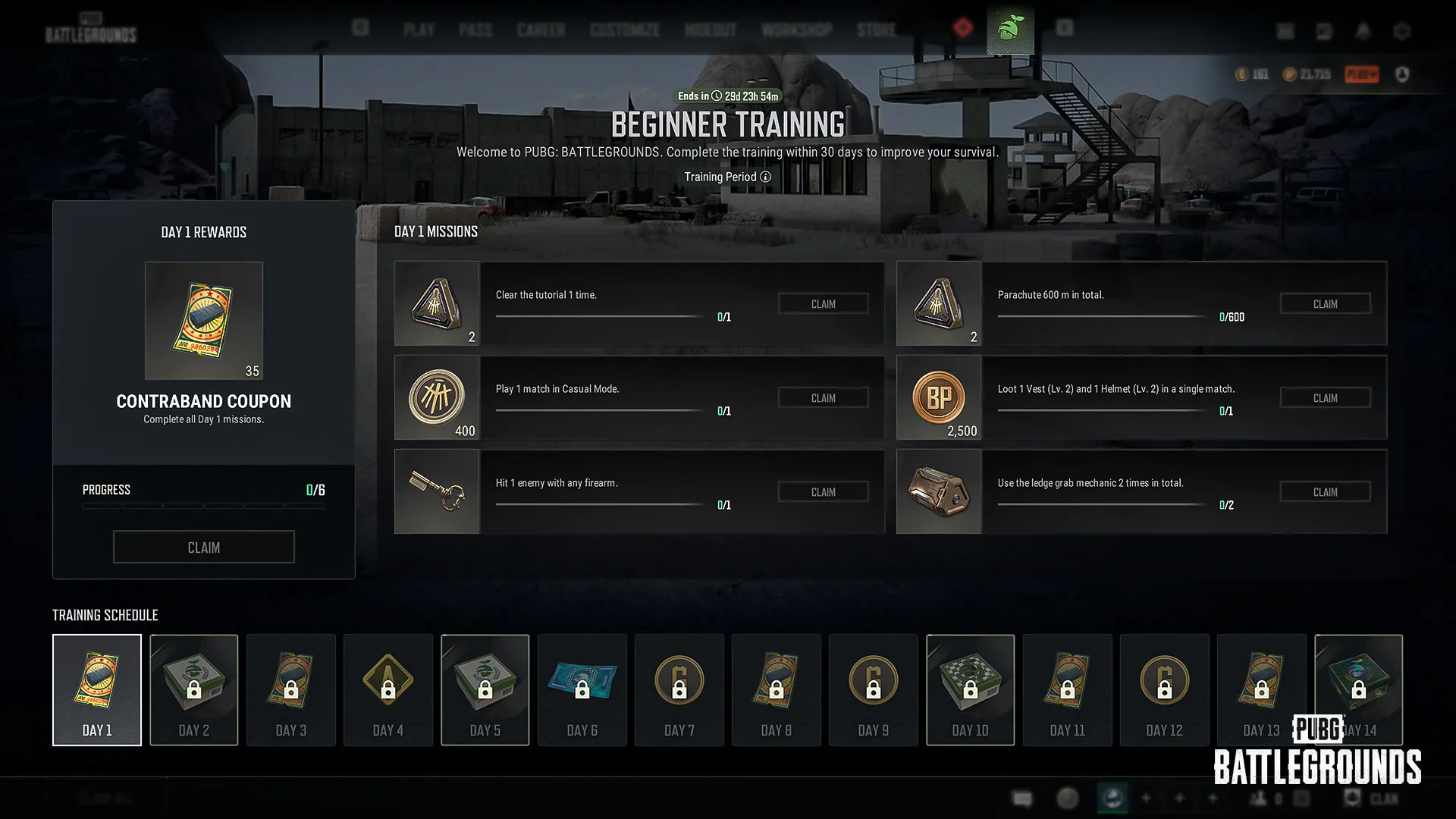
Beginner Training sits alongside the revamped tutorial and is available to all players, not only new players. Missions begin the first time a player enters the Lobby after Update 42.2, with new missions arriving each day through Day 14.
- You can enter Beginner Training from the Beginner Training menu at the top of the Lobby
- Beginner Training is available to all players, not just new players
- Missions begin the first time you enter the Lobby after Update 42.2, with new missions given each day
- Missions are provided through Day 14, and all missions must be completed within 30 days of starting Beginner Training. After 30 days, rewards can no longer be claimed
- You will earn a reward each time you complete a daily mission, and completing all missions for that day will grant an additional reward
- Any previously unclaimed tutorial rewards will no longer be available after Update 42.2 goes live, so be sure to claim them before the update
Console Graphics Mode Options
Update 42.2 adds two graphics choices on Xbox Series S, Xbox Series X, PlayStation 5, and PlayStation 5 Pro. Resolution Priority is the default option and targets sharper image quality with stable performance at up to 60 FPS. Framerate Priority targets smoother visuals and more responsive controls at up to 120 FPS on displays that support 120Hz or higher.
- Resolution Priority (Default)
- Prioritizes image sharpness and graphical detail while maintaining stable performance at up to 60 FPS
- Available on all display environments
- Framerate Priority
- Prioritizes smoother visuals and more responsive controls, supporting up to 120 FPS
- Available only on displays that support high refresh rates (120Hz or higher)
- Graphics Mode options can be set on Xbox Series S, Xbox Series X, PlayStation®5, PlayStation®5 Pro
Depending on the display setup, HDR may need to be disabled before the Framerate Priority option appears.
Map and World Changes
Taego’s Go Dok area has been restructured. The Secret Room’s shelving layout has also changed, and the room can now contain Ghillie Suits, a Pickaxe, Jammer Pack, Folded Shield, Mountain Bike, Mortar, Repair Kit, M79, Stun Gun, Zipline Gun, and Emergency Cover Flare.
The Taego Secret Room weapon pool now includes Vector, ACE32, M24, Kar98k, Micro UZI, UMP, and S12K, while K2, VSS, and S686 have been removed.
Rondo receives a wider map pass. New roads improve traversal routes, some water areas are easier to cross, difficult ridgelines have been adjusted, peripheral buildings have been removed, and several building layouts have been changed to improve looting.
- Care Package weapons previously had a chance to spawn in each weapon category slot. They now have a chance to spawn only from the dedicated Care Package weapon slot
- The Rondo weapon spawn pool has been changed
- Added: S12K, UMP, MP5K, JS9
- Removed: VSS
The Erangel Hall of Fame has been updated to celebrate FULL SENSE’s PGC 2025 victory.
World Map and Communication
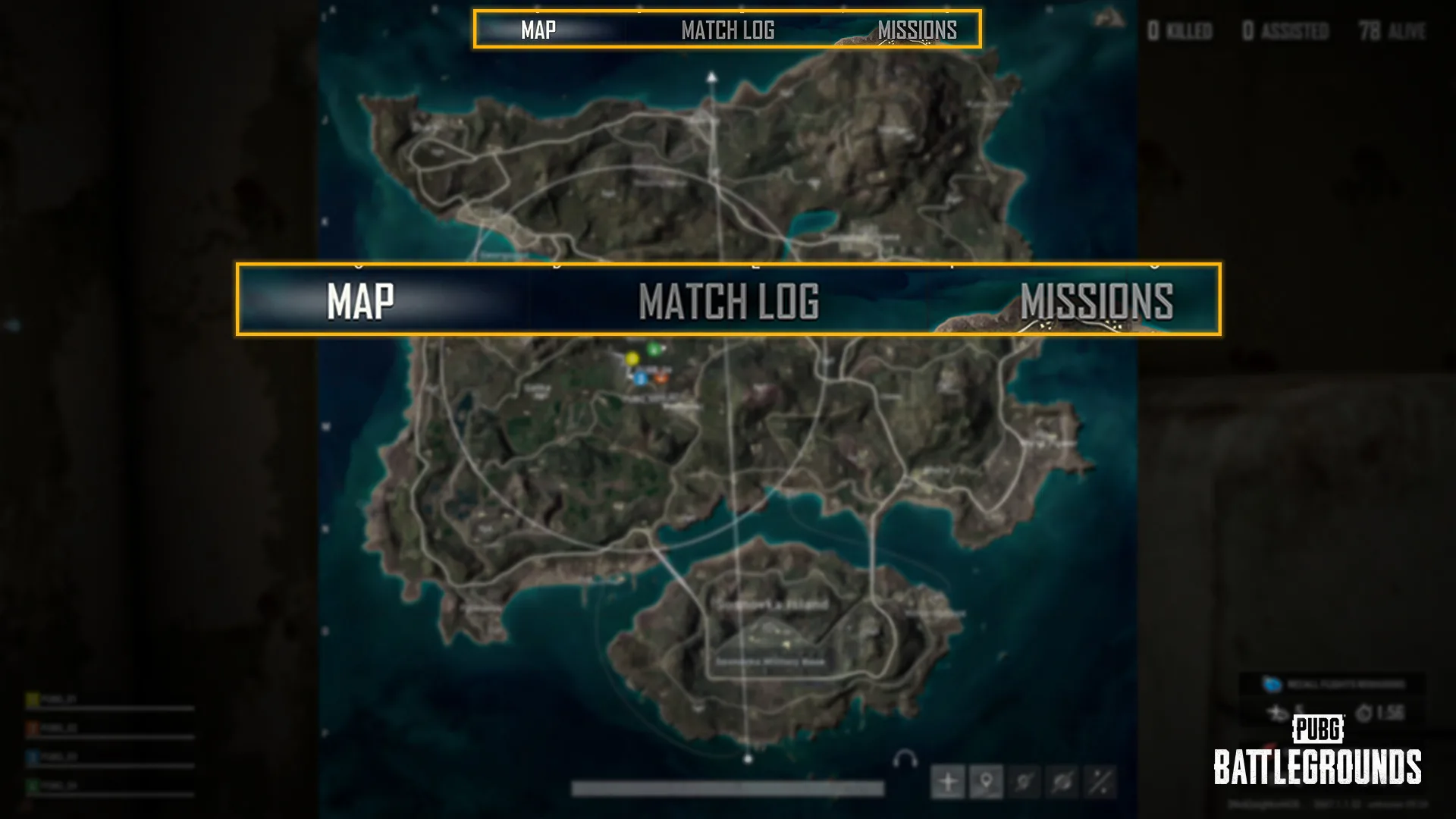
The World Map now includes Map, Match Log, and Missions tabs on one screen. PC shortcuts are M for Map, U for Missions, and Y for Match Log. The Match Log and Mission List have been removed from the System Menu opened with the ESC key.
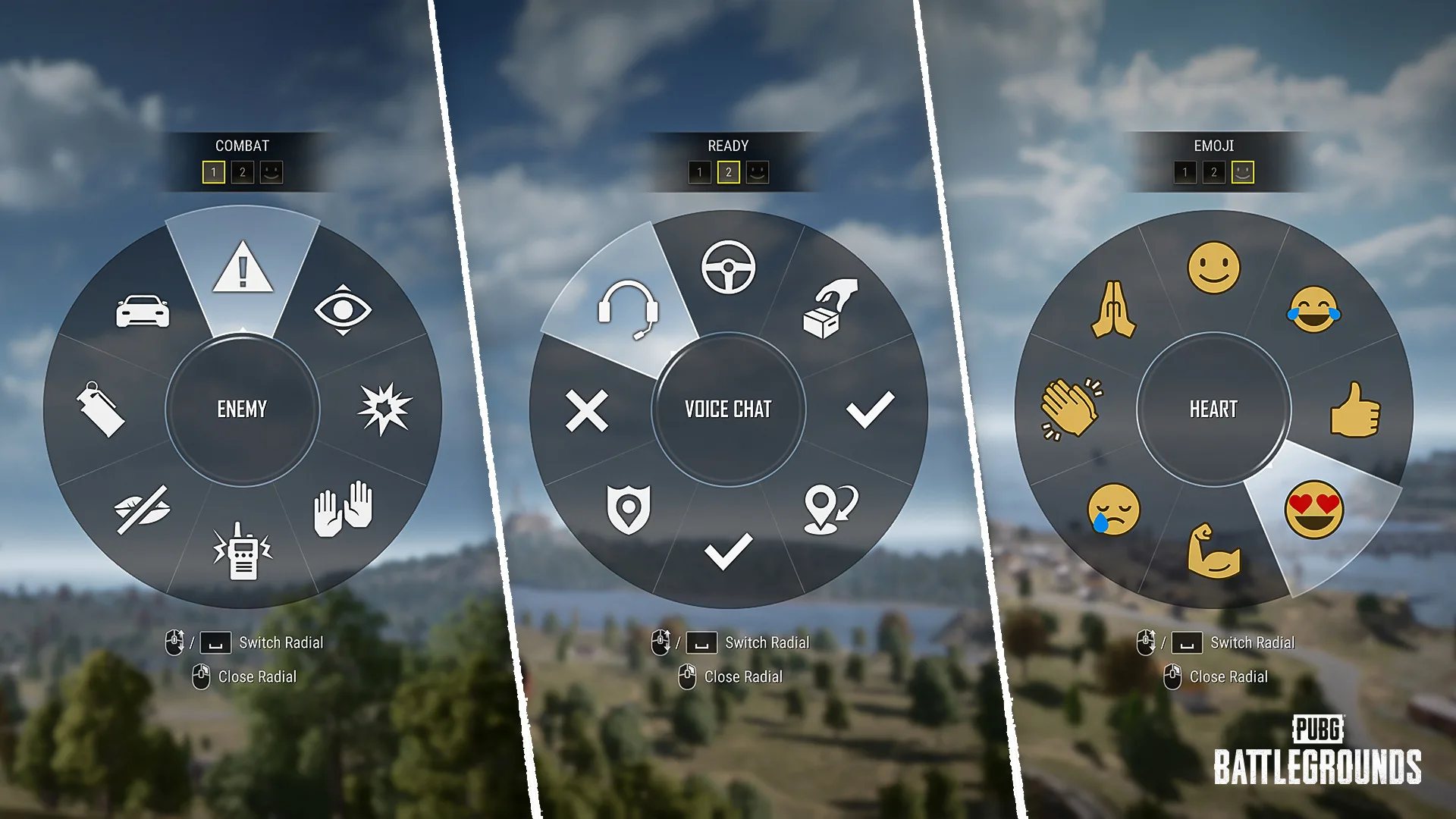
The Message Radial now opens faster and displays icons with their corresponding message text. The World Message Radial separates combat messages, looting and combat preparation messages, and emojis across three pages. Players can preview a marker’s position before confirming it, and PC players can crouch, go prone, or lean while the radial is open.
- Placing a regular marker now notifies your teammates via a radio message.
- Markers placed on items are now treated as separate Item Markers.
- Item Markers appear and disappear independently of World Markers, and are cleared automatically when the marked item is moved into the inventory, a trunk, or elsewhere.
- Pressing the Del key removes both regular markers and Item Markers.
- Enemy Spotted markers can now be placed through the World Message Radial as well.
Console Control Changes
- On the Inventory screen, the Radio Message input has been changed from L3 to R3. As a result, actions previously mapped to R3—using items, equipping or swapping weapon attachments, and switching slots—now use L3. Changing weapon slots and accessing Starting Island outfit presets now require holding L3
- While driving, the input for switching between Driver and Aim modes has been changed from R3 (hold) to pressing R3 twice
- In Preset Type C, the perspective-switch function previously assigned to R3 (hold) has been changed to D-pad Left (hold)
- When you open the World Map on console, you can now move the virtual cursor with the R Stick and press R3 to place markers and use other functions
- Pressing the B button while the Radio Message Radial is open will now close it
Arcade: Hot Drop Mode
Hot Drop Mode returns through Arcade. It uses MMR matchmaking, supports TPP squads, and is available through Play > Arcade > Hot Drop Mode. PC matches support 24 to 64 players, while console matches support 12 to 32 players.
- Maps: Erangel, Miramar, Vikendi, Taego
- Team Mode: Squad
- Squads of 1–3 players are also allowed.
- Perspective: TPP
- A very small safe zone forms over a set part of the map and closes toward the center quickly.
- Leaving the zone deals heavy damage, and the safe zone closes even faster in the later stages of the match.
- Special zones such as the Red Zone and Blizzard Zone will not appear.
- Vehicles, Care Packages, boats, and trains will not spawn.
Hot Drop Mode is scheduled to run from July 15 through July 29 on PC, and from July 23 through August 6 on console. The service period is listed in UTC as follows:
- PC: 2026/07/15, 00:00 – 2026/07/29, 07:00
- Console: 2026/07/23, 01:00 – 2026/08/06, 07:00
Arcade: Solo Deathmatch
Solo Deathmatch is a new FPP Arcade mode for PC and console. Each round lasts 10 minutes, and the first player to reach 100 points wins. If nobody reaches 100 points before time expires, the highest scorer wins.
The mode supports 10 to 14 players and uses Erangel – School, Sanhok – Camp Charlie, and Taego – Palace. Players earn two points per kill, three points per kill from a three-kill streak onward, and one point per 100 damage. Care Packages appear when a player first reaches 20, 40, 60, or 80 points. Eliminated players respawn at a random location with brief invincibility.
- Go to Play > Arcade > Solo Deathmatch to play the mode. It’s also available in Custom Match.
- Perspective: FPP
- Maps: Erangel – School / Sanhok – Camp Charlie / Taego – Palace
- Each round runs for 10 minutes. The first player to hit 100 points wins, or if no one does until time expires, the highest scorer takes the round.
- When you die, you respawn at a random spot with brief invincibility.
- Eliminating enemies fills your boost gauge. After not taking damage for 5 seconds, your health will regenerate, depleting your boost gauge.
- Press M to change your Spawn Kit or check the leaderboard.
Solo Deathmatch is scheduled for July 29 through August 11 on PC, and August 6 through August 18 on console.
Contender: Glasya
Glasya is a new Contender with an exclusive Execution Move. After reaching Level 2, equipping a Crowbar while wearing the Final Verdict Hammer or Final Verdict Hammer (Gold) melee weapon skin applies a special effect and allows Glasya’s Execution Move to be used on knocked-out enemies.
Workshop and Survivor Pass
The Hunter’s Chest and Archivist’s Chest receive new item sets, including Punk Bunny’s Hoppy Chuseok and Survivor Pass: Donut Debacle. A new Survivor Pass called Just Married is also announced, with further details planned for the July Store Update announcement.
Ranked
PC EU Ranked Squad (TPP) operating hours are changing to 13:00–24:00 UTC. Ranked service schedules may continue to change to support service stability and matchmaking quality.
Miscellaneous Updates
- The secondary password button at the bottom of the Career screen has been removed. You can now set or reset it by using the icon in the top-right corner of the lobby.
- Some in-game images, such as the title screen and maintenance screen, have been changed.
- The lobby now always displays high-quality graphics regardless of your in-game graphics settings, while in-game graphics can still be adjusted directly in the Settings menu as before.
- Optimized the Sanhok map to reduce frame drops.
- Improved combat to run more smoothly without stuttering.
Bug Fixes
- Fixed an issue where incorrect animations were occasionally displayed during gameplay.
- Fixed an issue where the incorrect message “You were killed by you” was displayed when a player knocked out and killed by the Blue Zone.
- Fixed an issue where changing seats mid-fire in the Pony Coupe would sometimes leave the character in a broken pose.
- (Console) Fixed an issue where audio did not play according to the configured sound settings.
- Fixed collision, texture, performance, and some other general Taego issues.
- Fixed an issue where Contender: Eve’s weapon extended slightly beyond its designated area in the inventory.
- Fixed an issue where the checkmark on an equipped emote or spray disappeared after restarting the lobby.
- Fixed an issue where a warning icon appeared in the pop-up when leaving a match in the Training Ground or Normal Match.
- Fixed an issue where the Nautical Nomad Set icon image was incorrect.
- Fixed a clipping issue that occurred when the female character wore the B.Duck Top with the Combo Chaos Shorts.
- Fixed an issue where special vehicle skins did not apply correctly in UGC: Racing Mode.
Update 42.2 is scheduled to bring one of PUBG’s broadest tutorial overhauls in some time, alongside a fast new arcade option and a long list of map, interface, and performance changes. Tell us what you think of the update in the comments, and follow us on X, Bluesky, YouTube, and Instagram.
PUBG: Battlegrounds
Developed by PUBG Corp

PUBG: Battlegrounds is a battle royale shooter that pits 100 players against each other in a struggle for survival. Gather supplies and outwit your opponents to become the last person standing.
- Genre Shooter
- Platforms Google Stadia, Xbox Series X|S, PlayStation 4, PC (Microsoft Windows), PlayStation 5, Xbox One
- Perspective First person, Third person
- Modes Single player, Multiplayer, Co-operative, Battle Royale
- Release December 20, 2017
- Publisher Bluehole Studio, Microsoft Studios
-
Age Rating