Sunkenland v0.8.30 Adds Character Save Recovery and Server Path Options
The update also fixes NPC quest tracking, ship destruction, and neutral-island map colors.

Sunkenland Update v0.8.30 adds a way to restore older character saves, along with new custom save-path support for dedicated servers. The official Steam announcement was published on July 24, 2026, and also details three bug fixes.
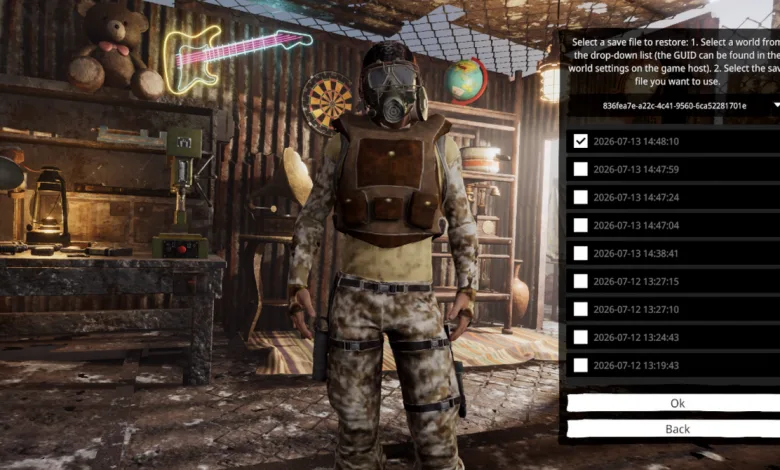
The new character recovery option keeps up to nine historical character save files available. Players can access it from the Character Selection screen, choose a world and save file, then confirm the restoration. World names are not shown yet because of current save-system limits, and support for displaying them and restoring world save history is planned for a future update.


Dedicated server operators can also use the -steamID launch parameter to load saves from a custom location. Without that parameter, the server continues to use the default save folder. The announcement also points server administrators to the updated Dedicated Server Manual before they change their scripts.
For context, this follows the recent v0.8.24 bug-fix update, which addressed island spawns, elevators, achievements, and quest progression.
The official Steam announcement contains the full details for Update v0.8.30.
Sunkenland Update v0.8.30 Patch Notes
The biggest changes affect save recovery and dedicated server setup. Players gain more control over character save restoration, while server hosts can point the game toward a custom save directory. The update also corrects quest status tracking, ship sinking behavior, and map colors.
Bug Fixes
- Fixed an issue where NPC Eva’s status would not update with quest progression.
- Fixed an issue where heavily damaged ships would sink and be destroyed too quickly.
- Fixed incorrect map colors for neutral islands.
New Features
Character Save History Restore
We’ve added a Character Save History Restore feature, allowing you to restore previous character saves. You can choose from up to 9 historical save files to replace your latest save.
Please use this feature with caution. The restore option can be accessed from the Character Selection screen.
How to use:
- Select the desired world from the drop-down list. (The World GUID can be found in the host world settings.)
- Choose the save file you want to restore.
- Click Confirm.
Note: Due to current save system limitations, world names cannot be displayed at this time. Support for displaying world names and restoring world save history will be added in a future update.
Dedicated Server
Added support for custom save paths.
When launching the dedicated server with the launch parameter:
-steamID
save files will be loaded from:
C:UsersAppDataLocalLowVector3 StudioSunkenlandWorlds
If the parameter is not specified, the server will continue loading saves from the default location:
C:UsersAppDataLocalLowVector3 StudioSunkenlandSteamCloudDataWorlds
Please read the updated Dedicated Server Manual before configuring your server scripts.
Will the save-history tool help protect your next Sunkenland run? Share your thoughts in the comments, and follow us on X, Bluesky, YouTube, and Instagram.
Sunkenland
Developed by Vector3 Studio