Schedule 1’s latest beta is built for controller play
Version v0.4.6 Open Beta adds Xbox and DualSense prompts, a virtual cursor, a new state system, and a long list of performance and bug fixes.

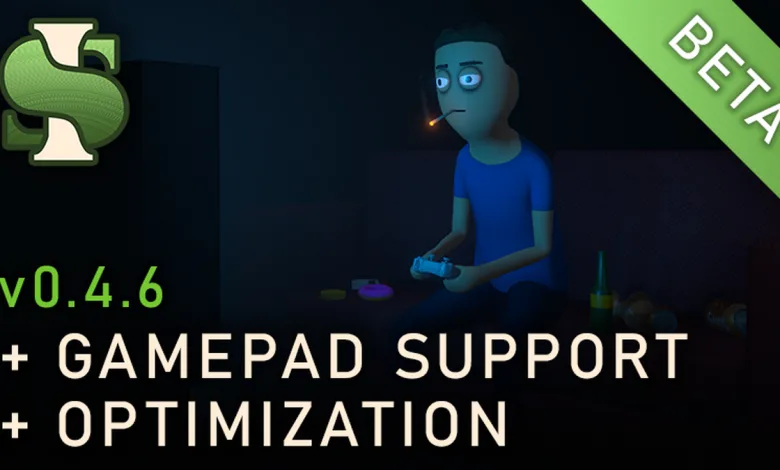
Schedule 1 just pushed v0.4.6 Open Beta, and the headline change is easy to spot: the game is now leaning hard into controller play. The update adds controller and gamepad support, Xbox and DualSense prompts, a virtual cursor, and settings built around pad input.
There is plenty under the hood too. The beta adds a new internal state system, a fullscreen fade tied to the platform overlay to stop stray inputs, and a chunk of optimization work across lighting, shadows, UI, and terrain. The game’s special customers vote helped point the next round of work in a different direction, but this build is mostly about control, cleanup, and making the game behave better across different systems.
Patch Notes v0.4.6 Open Beta
The full changelog covers input, interface, rendering, and performance work, along with a long bug fix list. Here are the official notes:
Additions
- Added controller/gamepad support.
- Added Xbox controller input prompts.
- Added PlayStation DualSense input prompts.
- Added gamepad-related settings.
- Added new internal ‘state system’, integrated with all menus, interactions, etc.
- Added platform-integrated fullscreen fade. (prevents unintentional input when the Steam overlay is opened).
- Added virtual cursor for gamepad.
- Added virtual cursor ‘friction’ system to make it easier to grab stuff.
- Added virtual cursor ‘lure’ system to make click-heavy tasks less tedious on gamepad.
- Added new client-side code to interface with the new in-game feedback system backend.
- Added fancy new tree ‘billboard’ shader that closely matches the tree mesh.
- Added ‘quit’ command.
- Implemented new light source culling solution.
- Added new shadow optimization tool that reduces/culls shadows at a certain distance.
- Your organisation name is now displayed in the pause menu.
- Combined and optimized several buildings.
- Property contents culling is now staggered over several frames to minimize stuttering when approaching/leaving a property.
- Tweaked the LOD distances of several buildings, props, etc, to reduce pop-in.
- Created new, higher quality LODs for several buildings and props.
- Property light sources now culled when distant.
- Added new player ‘visibility points’ at the neck and hips to prevent cheesing NPC vision.
- Added ‘stop arrow’ button to the pickpocket interaction.
- Added some more grime to the police station.
Tweaks/Improvements
- The game can now be paused in any state (in vehicle, phone open, active dialogue, etc) instead of requiring everything to be ‘closed’ before pausing.
- Rewrote the tree shader to be way more efficient.
- Police patrols, sentries, checkpoints now assign 1-2 officers instead of 2 all the time.
- NPC data (name, appearance, voice, etc) is now all centralized to a single data container instead of spread across lots of separate components.
- Tweaked shop UI.
- Cleaned up, modularised the UI for all stations.
- Rebuilt the input prompt system to support gamepad buttons.
- Improved the audio blending algorithm for going inside/outside when its raining.
- ‘Inventory empty’ displayed when trying to pickpocket an NPC with nothing in their inventory.
- Improved movement animations when moving slowly or diagonally.
- Display settings now apply automatically instead of needing to press ‘apply’,
- Made some visual tweaks to the phone home screen.
- Optimized interaction physics checks.
- Tweaked UI alignment in the deal screen.
- Tweaked counteroffer UI.
- The game will now automatically pause when losing focus (alt-tabbing).
- Optimized lots of shadow-casting lights.
- Turned off baked occlusion culling (its calculations were actually more expensive than just rendering everything).
- Adjusted the compression format of lots of audio files to minimize CPU spikes due to decompression at runtime.
- Separated out lobby logic from interface.
- Rewrote the platform integration code (achievements, lobbies, invites, etc) to be platform-agnostic.
- Increased max UI scaling to 1.5.
- Turned off shadow casting for lots of tiny meshes.
- Cleaned up weather code, moved several weather components to the core DLL.
- Removed legacy sky system.
- FOV now has a lower limit of 20.
- Converted NPC deal behaviour from schedule event -> behaviour.
- Increased how much trees/bushes obscure NPC vision.
- Pressing ‘I’m stuck’ will now teleport your vehicle back to safety if you are driving.
- Rebuilt the barbershop and tattoo parlour UI.
- Rebuilt the ‘new mix discovered’ interface.
- Stripped lots of shader variants to minimize memory use.
- Reduced the resolution of several unnecessarily massive textures.
- Optimized some UI layout calculations.
- Rebuilt the vehicle repaint interface.
- Optimized compass UI rendering.
- The management clipboard object selector mode now multi-selects by default – no need to hold ‘shift’ anymore.
- Rewrote a bunch of miscellaneous code to minimize GC allocation.
- Police vehicles now pooled instead of spawned/destroyed.
- Scripts using repeating checks now stagger their logic instead of running everything in a single frame.
- Implemented Linux-compatible region check (for choosing default metric/imperial).
- Optimized several distance checks to use square distance.
- Tweaked texture streaming settings to minimize excessively low-res textures for certain buildings.
Bug fixes
- Fixed suppliers not looking at the player.
- Fixed suppliers not returning to their meeting location after being interrupted.
- Fixed police sometimes not ‘sharing’ their player line-of-sight with other officers.
- Fixed bushes not obscuring players properly.
- Fixed cartel influence popup overlapping with compass warning labels.
- Fixed quest UI too close to top of screen on high interface scales.
- Fixed jerky vehicle movement when in ‘kinematic mode’ (optimization used for distant vehicles).
- Fixed baggies getting caught on the packaging station hopper lid.
- Changed some Windows-specific file path code to work for other OSes.
- Fixed z-fighting when building objects.
- Fixed weird lighting on environmental graffiti and grime.
- Fixed weird shadow pop-in for trees at sunset/sunrise.
- Fixed volumetric light beam flickering.
- Fixed environmental text causing stuttering when enabled/disabled.
- Fixed lens flare excessive CPU usage.
- Fixed CPU/memory spike due to audio sources subscribing to an event on enable/disable.
Schedule 1’s controller push should make the beta feel a lot friendlier for anyone playing away from mouse and keyboard, while the optimization work should help smooth out some of the rough edges that have piled up around the edges of the game. Share your thoughts in the comments, and follow us on X, Bluesky, YouTube, Instagram.
Source: Steam