PAYDAY 2 Update 249 Adds an In-Game ModWorkshop Browser
The 15GB update supports override mods, while frequent online-lobby disconnects are still awaiting a promised SDK fix.

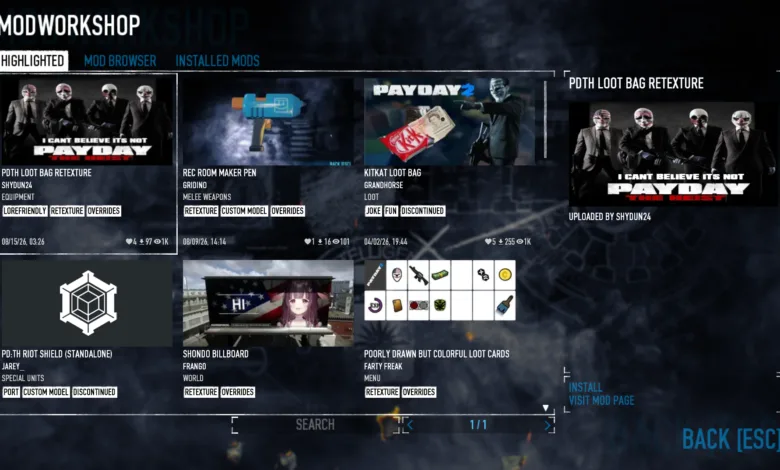
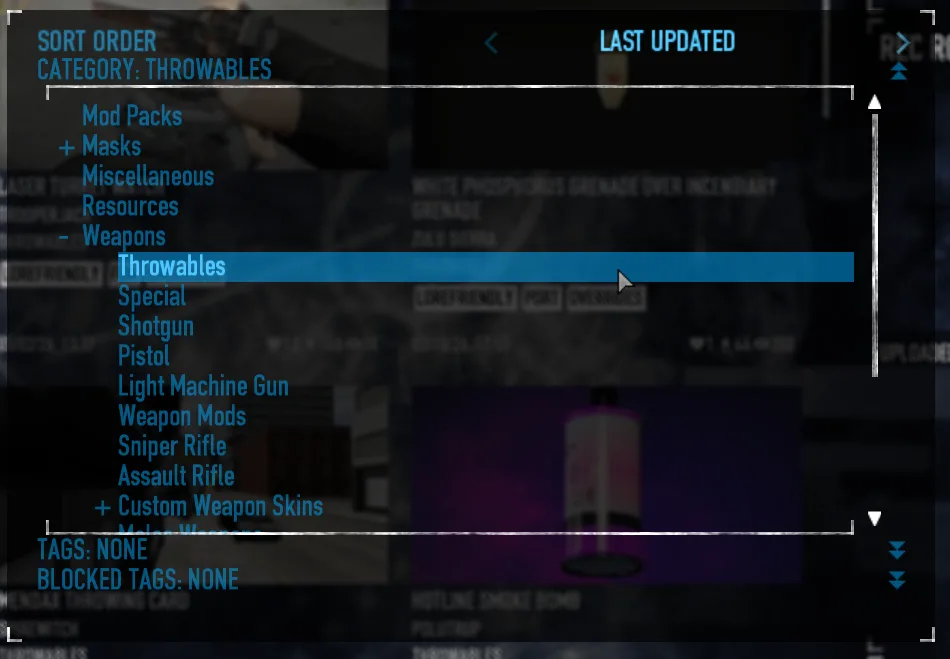
PAYDAY 2 Update 249 adds a built-in ModWorkshop browser, letting players search for and install mod_override mods without leaving the game. Its first version covers override mods such as texture and model changes, with browsing by category and tag.
The browser includes search tools and draws on ModWorkshop categories and tags. Players can install supported mods directly from the menu.

The official Steam changelog lists a 15GB download size and attributes it to an issue with the build systems, apologizing for the inconvenience. Frequent online-lobby disconnects remain unresolved. Their cause has been identified, but the team is waiting for a promised SDK update to address the issue.
Update 249 also includes general optimization improvements for Under the Hammer. The earlier Update 248.2 patch had already improved optimization for the heist, though performance dips in parts of the map were still under investigation at the time.
PAYDAY 2 Update 249 Patch Notes
Modding
- Added in-game ModWorkshop menu for downloading mod_override mods
- Added a Safe Mode button to the crash handler that will start the game without loading mods.
- The game can also manually be launched into safe mode with the –safemode launch argument
General
- Reworked the brightness slider to work across all display settings on DirectX 11
- Fixed the “You’ve taken a hostage” voicelines triggering during stealth instead of before the first assault in loud as intended
- Fixed crash dump writing for people with usernames containing non-Latin characters
- Fixed a “dslRenderer” crash when using weapon sights with text displays on levels that used the same font
- Fixed the “Enemies can not be staggered from damage” CrimeSpree modifier blocking the effects of the “Counterstrike” skill
- Potentially fixed a crash related to taser actions
- Fixed Snipers and harasser enemies tracking targets through walls
- Fixed weapons shot by Team AI not drawing enemy attention
- Fixed an issue causing civilians affected by concussion effects to not be interactable
- Fixed a crash when joining a game while an enemy is playing an on-fire animation.
- Fixed a memory leak related to the Dire Need skill
Interface
- Added numerical display values to the brightness slider
- Made “Borderless Windowed” the new default display option
- Fixed multiple cases of Perk Deck descriptions displaying the wrong stats
- Fixed a visual bug that occurred on the region boundaries when zooming in on Crime.Net
Heists
- Heat Street
- Fixed an issue causing Matt to spawn a floating phone during certain animations
- Under the Hammer
- General optimalization improvements
Mods may be incompatible with the update, including ones that seem unrelated. If troubleshooting, remove installed mods first. For an unmodded game, use Steam’s Verify Integrity of Game Files option from PAYDAY 2’s Properties menu under LOCAL FILES.
Which texture or model override would you want to browse for first in PAYDAY 2’s new menu? Stay connected for more on the in-game mod browser through X, Bluesky, YouTube, Instagram, Steam, or Telegram.


