Gray Zone Warfare patch 0.4.5.0 is live, and squads can tackle tasks together now
The update also changes conflict zones, adds a coma state for critical injuries, and updates supported NVIDIA features to DLSS 4.5.

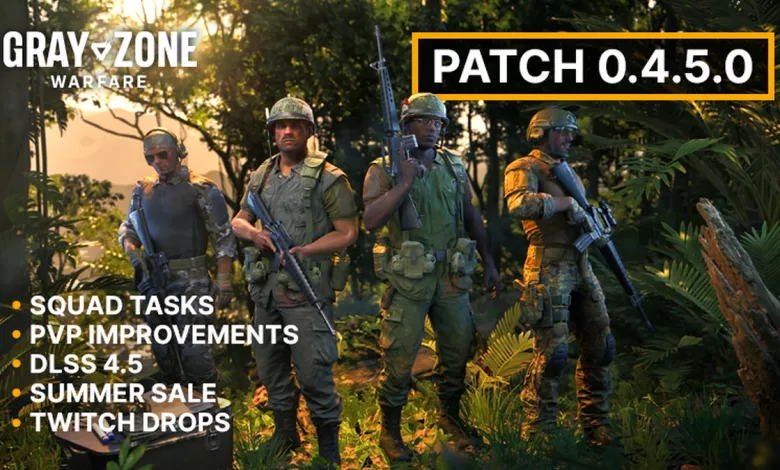
MADFINGER Games has pushed Patch 0.4.5.0 live for Gray Zone Warfare on Steam, and the update brings squad task sharing, changes to PvP and COP rules, and DLSS 4.5 support. If the download does not appear right away, the studio says to restart Steam.
For context, this follows the earlier Hotfix 0.3.5.2, which was a much smaller pass aimed at stability and quality-of-life fixes.
MADFINGER Games also posted two videos tied to the patch:
Patch Notes: Gray Zone Warfare 0.4.5.0
Patch 0.4.5.0 adds squad task sharing, changes how conflict zones and COP takeovers work, and brings in DLSS 4.5 support. It also closes a long list of bugs across AI, animation, audio, tasks, UI, rendering, weapons, and the world.
Overview
Patch 0.4.5.0 introduces squad task sharing and several notable changes to PvP and COP mechanics. The patch also brings DLSS 4.5 support and includes various bug fixes, most notably fixes for AI NPCs making grunting sounds after death and the invisible handguard on the SIG MCX.
Squad Task Sharing
You can now play selected tasks with your squadmates. After forming a squad, the leader can accept selected tasks so you can work on them together, coordinate objectives, share progress, and complete missions as a group.
All participating squad members must be deployed on the same server, have the task’s region and vendor unlocked, and meet the task’s prerequisites. These conditions ensure that everyone joining the task can contribute meaningfully, follow the same progression path, and receive the appropriate rewards for the squad’s efforts. Tasks already in progress, long-term contracts, boss kill tasks, and Chameleon tasks cannot be shared.
Shared tasks with a survival condition will fail if a squad member dies in action, so we are implementing another important change: players now enter a coma when critically injured rather than dying immediately, giving them a chance to be revived. Coma duration has also been extended to eight minutes.
PvP and COP Mechanics
We are implementing a cooldown on COP takeovers. After being captured, a COP cannot be recaptured for 30 minutes. We are also making changes to the PvP conflict zones:
- A conflict zone is now centered at the attacked player’s position
- The size (diameter) has been increased to 400 meters
- The timer is refreshed when a player is killed within the conflict zone
- Players killed within a conflict zone can no longer respawn in the nearest COP and must respawn at the base camp
We heard your feedback on the current COP PvP experience, where respawning at COPs allowed players to return to fights too quickly before their opponents had a chance to recover. These changes aim to rebalance this aspect of the game. We hope you enjoy these changes and look forward to your feedback. The full list of changes in Patch 0.4.5.0 continues below.
Changelog
AI
- Fixed an issue where AI NPCs could spawn below ground and then teleport to the surface, making them appear to spawn close to players
- Fixed an issue where AI NPCs performed an unnatural weapon animation after spawning
- Fixed an issue where the magazine did not detach from the M4 during the AI reload animation in third-person view
Animations
- Fixed an issue where players could enter the free-fall animation without dying on impact
- Fixed an issue where players could cancel the jump recovery animation by jumping
- Fixed an issue where players could rotate during landing animations
- Fixed an issue where breathing animations switched abruptly during state transitions
- Fixed an issue where leaning while reloading in the prone position broke the animation
- Fixed an issue where canted shotguns and bolt-action rifles returned to the default position between shots
- Fixed an issue where the left hand was in an unnatural position when using the SA Vz. 58 with a foregrip
- Fixed an issue where performing an emote right after equipping a grenade caused the left hand to deform
- Fixed an issue where players could perform the weapon check animation while swapping weapons
- Fixed an issue with the reload animation of the M700 for AI NPCs
Audio
- Fixed an issue where AI NPCs could make grunting sounds after death
- Fixed an issue where Vietnamese radios did not play the correct audio
Gameplay
- Fixed an issue where players could become invulnerable to shots from other players
- Fixed an issue where certain lamps did not affect player visibility as intended
- Fixed an issue where magazine durability degradation did not apply the reload speed penalty to extended magazines
- Fixed an issue where a house alarm could be triggered without opening the linked doors
Tasks and Tutorial
- Fixed an issue where “At the Mounds of Madness” did not fail upon death despite having a survival condition
- Fixed an issue where Chameleon tasks did not reset after failing
- Fixed an issue where the description of “Unstable Meeting” pointed to an incorrect location
- Fixed an issue where the task marker was missing for “Deepest, Darkest Fantasies” when it was available on the map but not yet accepted
- Fixed an issue where the task banner for “Big Fish” showed Gunny instead of Handshake
- Adjusted the wording of the task “Last Letter”
- Fixed an issue where Handshake’s icon was missing in the last tutorial message
- Fixed an issue where reconnecting to a previous session did not restart the ongoing tutorial section
User Interface and Controls
- Fixed an issue where conflict zones were not visible to players who joined a server after the zones had been created
- Fixed an issue where the Item Drop and Delete buttons were missing from the controls menu and could not be rebound
- Fixed an issue where the game mode did not update for squad members after the leader changed it and returned to the main menu
- Fixed an issue where the most valuable item statistic did not persist between expeditions
- Fixed an issue where the Exploration and Tasks statistics tab appeared in a different position in the main menu than when deployed on a server
- Fixed an issue where the faction description on the character creation screen was partially unreadable at specific resolutions
- Fixed an issue where the Pha Lang Airfield label overflowed the window boundaries in multiple languages
- Fixed an issue where the text on the “Psychotic Note” intel item was displayed incorrectly
- Fixed an issue where attaching a broken weapon part did not display a message explaining why the attachment failed
- Fixed an issue where the server maintenance window could block the continue button on the major wipe notification pop-up
- Fixed an issue where changing the system clock on a player’s PC affected the maintenance state shown on the client
- Added a button to join the official Discord server to the main menu
Visual and Rendering
- Fixed an issue where the scope image could turn black when using free look while aiming down sights
- Fixed an issue where the scope image could turn black after switching magnification
- Fixed an issue where the ACOG scope clipped through NVGs in emergency shutdown mode
- Fixed an issue where severe ghosting occurred when using NVGs with the TSR upscaling method
- Fixed an issue where the red dot remained visible in a magnifier after removing a collimator
- Fixed an issue where dying while canting a weapon caused various vegetation and scope rendering issues
- Fixed an issue where the weapon model could disappear after canceling medical item use
- Fixed an issue where rain particles were visible on the edges of the screen when looking up in the rain
- Fixed an issue where changing quality presets caused water to disappear until the player moved or jumped
- Fixed an issue where artifacts appeared in menus when Frame Generation was enabled
- Updated to DLSS 4.5, bringing 6X and Dynamic Frame Generation to supported NVIDIA graphics cards
Weapons and Weapon Parts
- Fixed an issue where the SIG MCX 8″ Handguard FDE purchased from Banshee was invisible in the Inspect window and in-game
- Fixed an issue where Bloodhound’s M-201C had an incorrect repair cost
- Adjusted the reload speed modifier on the MP5 Standard 30-round magazine
World
- Fixed an issue where players could climb over fences with barbed wire on top
- Fixed an issue where a military box could be looted through a closed window at Tiger Bay Pier Storage
- Fixed an issue where some loot was impossible to pick up due to incorrect collisions
- Fixed an issue where the glass railing at Pha Lang Airfield was impenetrable
- Fixed an issue where helicopters clipped through trees when flying from the LRI base camp to the Oscar 2 landing zone
- Fixed an issue where the Hotel 2 landing zone was placed too close to an area with AI NPCs
- Fixed an issue where a car door clipped into a concrete barricade at the main gate at YBL-1
- Fixed an issue where water did not drain completely at YBL-1
- Fixed an issue with a non-functional light switch in a house at Tiger Bay
- Fixed various instances of floating and clipping loot
- Removed a floating fish asset east of a captured LLA outpost in the Sawmill area
- Fixed an issue where wire trap parts floated in the air after the trap was sprung
- Fixed an issue where the “fake rock” asset was incorrectly named “supply crate”
- Fixed an issue where an area south of the Lima 2 landing zone was incorrectly named Hidden Poppy Fields
- Fixed an incorrectly named area near Kongthab Depot
Fixed the following locations where players could get stuck:
- Base Camp area: on top of the shelves in a luxury villa near the base camp
- Ban Pa area: between rocks near the India 3 landing zone (200, 140); between a tree and terrain near Tiger Bay Viewpoint (192, 136); between logs under a house near Old Pier (206, 137)
- Blue Lagoon area: between rocks in Blue Lagoon (204, 116); between rocks near the Kapu Boat Rental area (208, 121)
- Hunter’s Paradise area: on a toilet in the old bunker near Hunter’s Paradise (158, 170)
- Sawmill area: between rocks near Phousai Village (145, 146); in a hole between rocks near Kongthab Depot (134, 137)
- Tiger Bay area: between a wall and steps near the Gas Station in Tiger Bay (201, 126); between a tree and a structure in Tiger Bay (200, 128)
- YBL-1 area: between rocks near YBL-1 West (138, 120)
If you run into problems after installing the patch, report them to the support team.
If you’ve spent time with Patch 0.4.5.0, share your thoughts in the comments, and follow us on X, Bluesky, YouTube, Instagram for more updates.
Source: Steam
Gray Zone Warfare
Developed by MADFINGER Games

Enter a high-stakes PvE-first open-world tactical shooter set on a quarantined Southeast Asian island torn apart by faction warfare. Deploy as an elite operator, fight solo or with your squad to carry out missions, earn reputation, and explore the truth behind the Event igniting the conflict.
- Genre Shooter, Simulator, Adventure
- Platforms PC (Microsoft Windows)
- Perspective First person
- Modes Multiplayer, Co-operative, Massively Multiplayer Online (MMO)
- Release April 30, 2024
- Publisher MADFINGER Games
-
Age Rating