World of Tanks Twitch Drops reward viewers for time spent watching eligible livestreams, but the account setup matters before anything can be claimed. The system can hand out fixed rewards, mystery items, or mission unlocks, and each campaign follows its own watch-time rules.
Wargaming also published a companion video alongside the guide.
What Twitch Drops are
Twitch Drops are in-game rewards earned by watching participating streams on Twitch for a set amount of time. In World of Tanks, those campaigns can run on the official World of Tanks Twitch channel, on creator channels, or across the full category when a drop event is live.
There are three common Drop types:
- Guaranteed Drops, which are awarded after a set watch-time goal is met
- Mystery Drops, which pull a random reward from a preset pool that can include rarer items such as Premium vehicles
- Mission Drops, which unlock in-game missions instead of handing out a reward right away
Before a campaign starts, your Wargaming.net and Twitch accounts need to be linked through the Wargaming.net Account Management page.
How to link your accounts
Log in to the Wargaming.net Account Management page, click the Twitch button, and authorize the connection. Once that is done, Twitch should appear as a linked platform in your account settings.
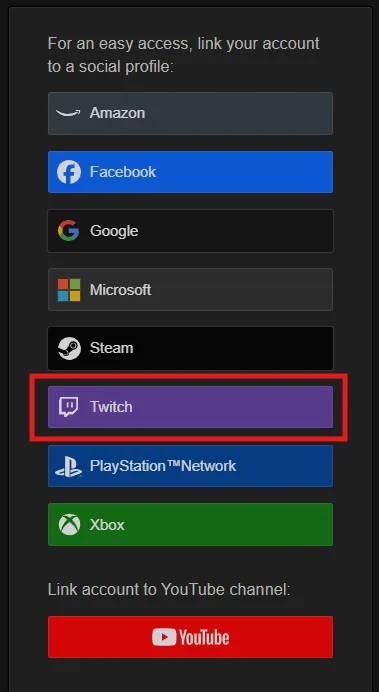
One detail matters here. A Twitch account can be linked to only one Wargaming.net account at a time, so the correct account needs to be attached before a Drops campaign begins. The linked account should also appear in Twitch account settings.
Steam players can still take part
Steam players are not locked out of Drops. The game account first needs to be linked to an email address through Steam, then the Wargaming.net account can be connected to Twitch. After that, the usual watch-and-claim steps apply.
Which streams count toward progress
Only livestreams with Twitch Drops enabled count toward rewards. Eligible streams are marked with the Drops Enabled tag, and official campaign announcements can also point players toward the right broadcasts. Official World of Tanks and Contributor channels can take part, but recorded streams and VODs do not count.
Not every World of Tanks stream has Drops active, so checking the tag matters before settling in for a long watch session.
Tracking and claiming rewards
Progress is tracked through Twitch’s progress bar, the Drops & Rewards area in the Twitch menu, or the Twitch Drops Inventory. Each reward has its own watch-time requirement, and once one Drop is earned, progress moves on to the next available reward in the campaign.
Watching multiple Drops-enabled streams at the same time does not speed things up. It can stop progress from being counted correctly, so the safest route is to keep one eligible stream active in the primary browser tab.
When the required time is reached, Twitch shows a claim notification. Clicking Claim sends the reward to the linked account, and it can also be claimed manually through the inventory page. In most cases, the reward arrives automatically after that, although a logout, restart, and fresh sign-in may be needed if the game is already open.
Drops must be claimed within seven days, or 168 hours, after the campaign ends.
When a Drop does not show up
If a claimed reward has not appeared in game, start by restarting World of Tanks, logging out and back in, and checking that the correct Twitch and Wargaming.net accounts are still linked. If that does not fix it, reconnect both accounts, confirm the stream had Drops enabled, disable browser ad blockers, and make sure the stream was not muted.
It is also worth checking the Twitch Inventory to confirm the reward was claimed, since account changes can sometimes create problems. The guide also warns that changing a Twitch or Wargaming.net password may unlink accounts automatically.
No Twitch Prime or Prime Gaming membership is needed for any of this. Most campaigns are shared across Europe, the Americas, and Asia-Pacific, although some events are region-specific or limited to certain channels.
If you’ve used World of Tanks Twitch Drops before, tell us what you think in the comments, and follow us on X, Bluesky, YouTube, and Instagram for more updates.
Source: World of Tanks
World of Tanks
Developed by Wargaming.net
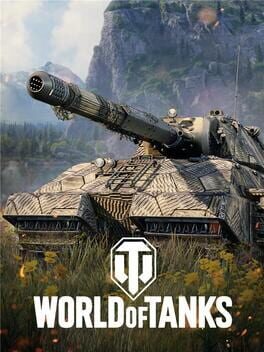
Jump into the free-to-play team-based shooter with an ever-expanding roster of historical vehicles, stunning graphics, spectacular locales, and orchestral scores. Battle it out in the company of other players in thrilling military conflicts. A unique mix of strategy and action awaits!
- Genre Shooter, Simulator, Strategy, Arcade
- Platforms PC (Microsoft Windows)
- Perspective First person, Third person, Bird view / Isometric
- Modes Multiplayer, Massively Multiplayer Online (MMO)
- Release April 12, 2011
- Publisher Wargaming.net
-
Age Rating