PUBG Update 43.1 Will Add Kicks, Better Water Combat and Faster Item Handling
PC maintenance is scheduled for September 10, with the console rollout planned for September 17.

PUBG Update 43.1 will add kicks, new water-surface combat options, more flexible item handling, a new Leaderboard menu, and a long list of balance and interface changes. The update is scheduled to arrive on PC after maintenance on September 10, 2026, while the console rollout will follow maintenance on September 17. The official Update 43.1 patch notes also confirm a PUBG x Jujutsu Kaisen collaboration, the return of Solo Deathmatch, and PC support for NVIDIA DLSS and AMD FSR. PUBG announced the Jujutsu Kaisen collaboration on September 6, and PUBG’s Jujutsu Kaisen collaboration announcement detailed its themed map content, rewards, and event schedule.
PC live maintenance is scheduled for September 10 from 00:00-08:30 UTC. Console maintenance is scheduled for September 17 from 01:00-09:00 UTC. PUBG notes that both schedules can change.
Update 43.1 changes close-range fights and movement
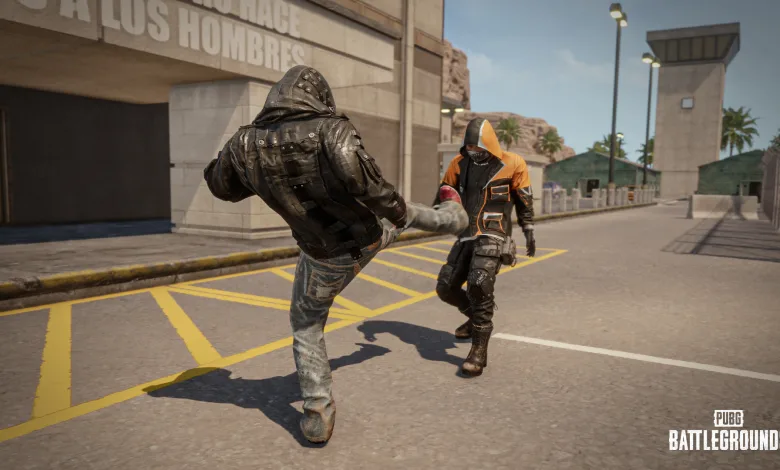
The most immediate gameplay change is the new Kick action, which works in every mode. Players can use a Standing Kick while unarmed or a Jump Kick while airborne. Kicks deal more damage and create stronger knockback than punches, letting players interrupt opponents, push them away, and break certain objects without drawing a weapon.
Water is also becoming a more practical route. Swimming and diving movement speed will increase by 25%, while players on the surface can use sidearms and throwables when stationary. Boats will receive higher durability, standardized firearm damage, and the ability to be repaired on the surface with an All-in-One Repair Kit.
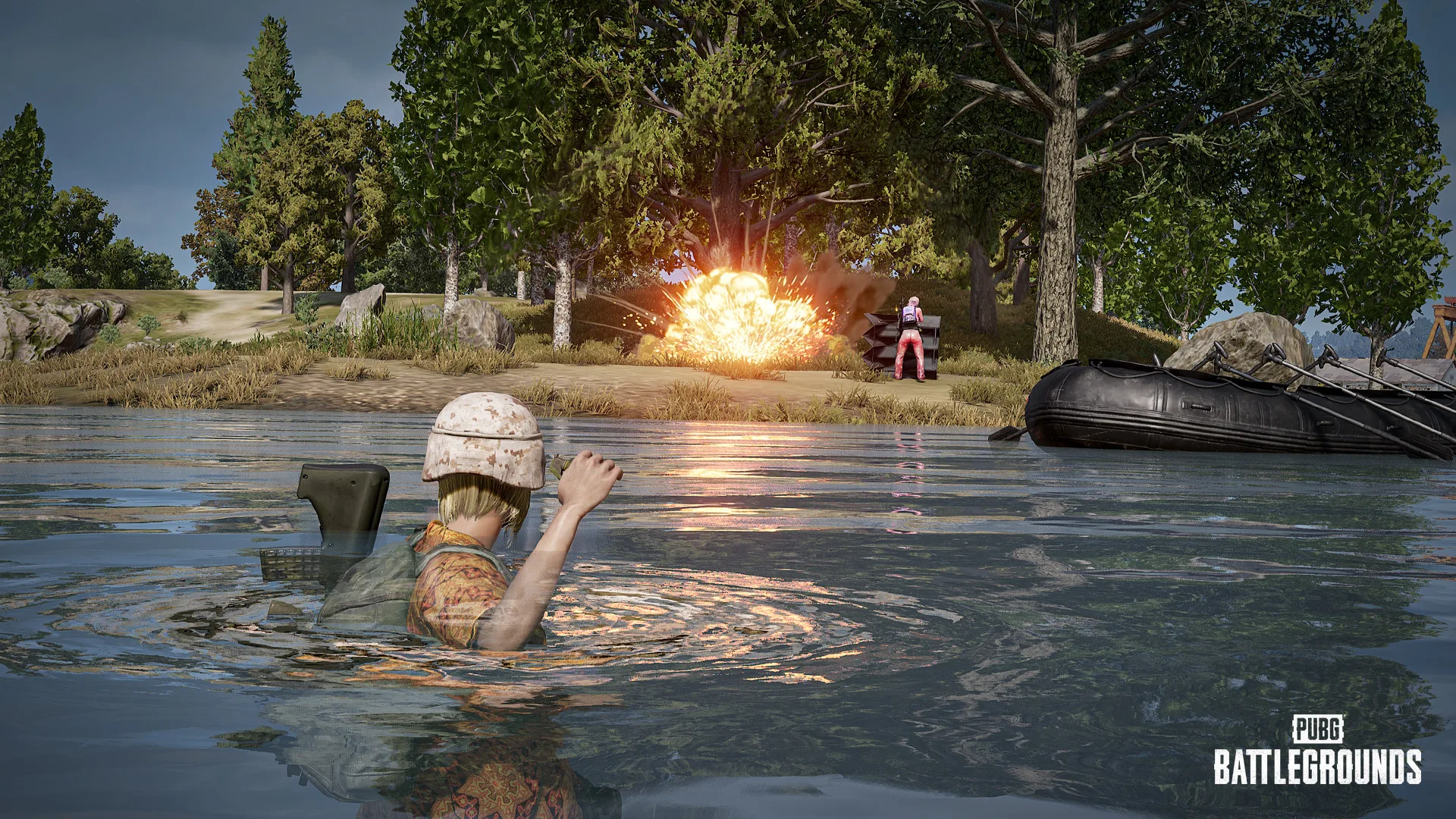
Looting gets a major quality-of-life pass. Players can carry certain ground items without using inventory space, throw carried equipment to teammates, and use selected healing, boost, deployable, mortar, and C4 items directly from the ground. On PC, the H key handles carrying and instant use, while console controls use LB + X.
LMGs will receive a broad reduction after Update 43.1. The RPD and M249 will lose their extra vehicle damage multiplier, the MG3 multiplier will fall from 1.25x to 1.1x, firing-position recoil benefits will be reduced, ADS transition time will increase from 0.30 seconds to 0.37 seconds, and world spawn rates for the RPD and M249 will be cut by 30%.
New ways to track performance
Update 43.1 will add a Leaderboard menu under Career. It will cover Ranked play, wins, kills, and clans, with filters for modes, maps, weapons, seasons, and regions where supported. Each leaderboard will display the top 500 players, although players outside that group will still be able to see their position as a percentage.
Ranked Season 43 will reset with live server maintenance. A permanent Mk14 Ranked Weapon Skin will be available as a Tier Reward, Gold and higher tiers will require more performance in Solo and Duo modes, and Archivist’s Chests will be replaced by Contender Cargo Tickets. TPP Duo Ranked service in the SA region will also be discontinued.
PC players will also receive DLSS and FSR options under Settings > Graphics > Advanced. The supported versions are NVIDIA DLSS 4.5 and AMD FSR 4.1, with manual or automatic quality selection available on supported systems.
Patch Notes for PUBG Update 43.1
Update 43.1 combines a gameplay pass with new competitive tracking tools, item-use shortcuts, PC graphics options, console hit detection changes, and bug fixes. The full official notes are reproduced below in their original order.
43.1 Highlights
PUBG x Jujutsu Kaisen collaboration content will bring the anime universe into the PUBG world. Kick, water-surface combat, carrying and throwing items, instant item use, Solo Deathmatch, improved match results, Ranked Season 43, Leaderboards, DLSS and FSR support, console hit detection changes, and additional customization options are included in Update 43.1.
Live Maintenance Schedule (UTC)
※ The times shown below are subject to change.
- PC: Sep 10, 2026, 00:00-08:30
- Console: Sep 17, 2026, 01:00-09:00
Map Service
Map rotations and regional map preferences are covered in the Map Service Report for Update 43.1.
World
Collaboration: PUBG x Jujutsu Kaisen
The PUBG world is infused with the Jujutsu Kaisen universe. Be the last one standing on Jujutsu Kaisen-themed battlegrounds.
※ The PUBG x Jujutsu Kaisen Collaboration World features will be available until the next update.
Gunplay
LMG Balance Adjustments
ADS Speed
- ADS transition time has been increased.
- 0.30 sec -> 0.37 sec
Damage to Vehicles
- Damage multipliers against vehicles have been reduced.
- M249, RPD: 1.1x -> 1.0x
- MG3: 1.25x -> 1.1x
Recoil by Firing Position
- The recoil control effects based on firing position have been reduced.
- RPD
- Recoil control while standing reduced by 10%
- Recoil control while crouching reduced by 17%
- Recoil control while prone reduced by 27%
- M249
- Recoil control while crouching reduced by 17%
- Recoil control while prone reduced by 27%
- MG3
- Recoil control while standing reduced by 15%
- Recoil control while crouching reduced by 17%
Spawn Changes
- World spawn rates for the RPD and M249 have been reduced by 30%.
Gameplay
Melee Action: Kick
※ Available in all modes.
Kick has been added, bringing a new variable to unarmed combat. Kicks deal more damage and have a stronger knockback effect than punches, allowing you to push back opponents, interrupt their actions, and interact with the surrounding environment in new ways.
- Two kick actions have been added.
- Standing Kick
- Can be used by right-clicking (Console: LT) while unarmed.
- Jump Kick
- Can be used by right-clicking (Console: LT) while jumping.
- The kick can be assigned to a key of your choice in Key Bindings.
- Standing Kick
- Interactions
- Kicks can be used not only against other players but also against various objects in the surroundings.
- The following objects can be destroyed with kicks:
- Windows
- Wooden doors
- Wooden fences
- Jars
- Tires
- Objects of the same type may not be destructible depending on their size or structure.
- Indestructible doors can be opened quickly with a kick.
- This does not apply to some doors.
- You can also kick vending machines to obtain items.
- You can obtain items faster than through regular interactions, but the vending machine will be damaged and unavailable for a while.
Water Surface and Underwater Actions
※ Available in all modes.
Jumping into the water is no longer just a last resort. Various movement and combat actions on the surface and underwater have been improved overall.
- Water Surface Combat
- You can now use sidearms and throwables on the water surface.
- You can use not only handguns but also items equipped in the 3rd slot.
- They can be used while stationary. Moving while holding a weapon or diving will automatically stow the weapon. The weapon will automatically be drawn again when you return to the surface.
- Sidearms can be used for hip-fire and ADS on the surface.
- Shoulder firing is unavailable.
- Bullet spread is higher than on land.
- Throwables can only be used with the overhand throw method.
- You can swim at a slow speed while aiming.
Swimming and Diving
- Swimming and diving movement speed has been increased by 25%.
- Speed according to movement direction has also been adjusted.
- A new swimming animation on the water surface has been added.
Boats
- The durability of boats has been increased overall.
- Firearm damage modifiers, which previously varied by boat, have been standardized.
- All boats receive 50% damage from firearms.
- You can repair boats on the water surface using an All-in-One Repair Kit.
- This is not available underwater.
Carrying and Throwing Items
※ This feature is available in all modes, except for some Arcade modes.
You can now directly carry, move, or throw certain items without placing them in your inventory.
Even when your inventory is full, you can move necessary items, and you can try new ways of exchanging items, such as throwing equipment directly to teammates.
Carrying Items
- Certain items on the ground can be carried with the H key (Console: LB + X).
- Carried items do not take up inventory space.
- You can carry only one type of item at a time.
- Items that spawn in stacks, such as ammunition and Bandages, can be carried in their default spawn quantity at once.
- Items in the following categories can be carried:
- Weapon attachments
- Healing and boost items
- Helmets
- Vests
- Backpacks
- Throwables
- Ammunition
- How an item looks while carried and what actions are available with it vary depending on its size.
- While carrying an item, its name and quantity, as well as the keys for throwing and dropping it, are displayed on the screen.
Throwing Items
- You can throw an item by left-clicking (Console: RT) while carrying it.
- The throwing method and distance vary depending on the item’s size.
- Thrown items collide with terrain and objects.
- Thrown items do not deal damage even if they hit a player.
Usage Conditions
- You can perform some actions, such as walking, running, and jumping, while carrying an item.
- The available actions may vary depending on the item’s size.
- Certain actions, such as entering a vehicle or drawing a weapon, automatically make you drop the item you are carrying.
- The item-carrying state is also canceled when you are knocked out, killed, swimming, vaulting, or climbing.
- The following actions cannot be performed while carrying an item:
- Crouching or going prone
- Picking up or using another item
- Interactions with another player such as carrying, reviving, and co-op climbing
- Using the Emote Wheel
Carrying a Death Box
Along with the addition of the item-carrying action, some actions involved in carrying death boxes have also been improved.
- The following actions can be performed while carrying a death box:
- Jumping
- Opening Care Packages
- You drop the death box you’ve been carrying when performing the following actions:
- Vaulting over terrain features
- Switching weapons
Instant Item Use
※ This feature is available in all modes, except for some Arcade modes.
You can now immediately use certain items placed on the ground without placing them in your inventory.
When your inventory is full, use necessary items more quickly and conveniently without the hassle of dropping existing items and picking them up again.
Instantly Using Ground Items
- Certain items on the ground can be used instantly by holding the H key (Console: Hold LB + X).
- Items can be used or deployed directly from their current location without picking them up.
- Items in the following categories can be used instantly:
- Healing and boost items
- Deployable items such as the Folded Shield and Emergency Pickup
- Mortar
- C4
- The existing item-specific usage conditions still apply.
- If an item cannot be used in your current state, the interaction key is displayed in red.
- Deployable items are deployed based on the player’s current location and facing direction.
- You can press the F key while using an item to cancel its use.
- The canceled item drops at the player’s feet.
- The time required to use the item is the same as when using it from the inventory.
Items Placed Together in a Stack
- Items that can be used consecutively, such as Bandages, can be used consecutively from a stack placed on the ground.
- Instant item use only applies to items placed on the ground.
- If you stop using them, the remaining items drop at the player’s feet.
- Items that cannot be used consecutively can only be used one at a time, while the remaining items stay in their original location.
- On Console, the configured consecutive item use option also applies to instant use of items placed on the ground.
Improvements to the Item Usage Experience
The overall item usage experience has been improved to make obtaining, equipping, and using items feel more intuitive and convenient.
UI/UX
- The position of key guides displayed on the screen has been moved from the left to the right.
- The key guide and interaction key designs on PC and Console have been improved and standardized overall.
- (PC) On the World Map screen, you can toggle the key guides on or off using the key guide toggle switch.
- The way slots are displayed in the inventory when obtaining and equipping items has been improved and standardized.
- When you possess two or more types of throwables in your inventory, the icon of the currently equipped throwable is displayed on the center HUD.
Retrieving Deployed Items
- More types of items can now be retrieved using the H key.
- The following items can be retrieved using the H key:
- Folded Shield
- Mortar
- Retrievable items among deployed ones can be viewed in the Vicinity item list in the inventory.
- The deployment and retrieval time of the Vehicle Camo Netting has been reduced.
Stun Grenade
- An issue where players could unintentionally evade the effects of Stun Grenade by using Free Look (Alt key) has been fixed.
- Stun Grenade effects now take into account not only the camera view but also the direction the character is facing.
Parachute Rebalance
The overall balance of parachutes used in various situations has been adjusted. While improving the usability of the Emergency Parachute, some rules have been changed to make the risks of falling from high places more intuitive.
- The altitude of the terrain you are falling from is taken into account when calculating the fall height, so slight discrepancies may occur.
Parachute
- The automatic parachute activation heights, which previously varied depending on the falling situation, have been adjusted.
- When falling after using an Emergency Pickup: 150 m -> 250 m
- When falling after respawning: 330 m -> 250 m
- This provides a more consistent parachute experience in most falling situations, except for special circumstances.
Emergency Parachute
- The minimum height at which the Emergency Parachute can be deployed has been adjusted from 10 m to 9 m.
- Once the parachute deployment button becomes available during a fall, the button will no longer become disabled.
- This makes it more intuitive to identify and use the point at which the parachute can be deployed.
- If you land early before the parachute is fully deployed, you will now take fall damage.
- The faster your falling speed when landing, the more damage you will take.
Arcade
Solo Deathmatch
A battle where you can only rely on yourself! The fan-favorite Solo Deathmatch returns with the September Update!
- Go to Play > Arcade > Solo Deathmatch to play the mode. It is also available in Custom Match.
Service Period (UTC)
- PC: Sep 10, after live server maintenance – Oct 14, 00:00
- Console: Sep 17, after live server maintenance – Oct 22, 01:00
Intense Battle Royale
※ The following update also applies to Custom Match.
The Match Results screen has been improved so you can review your performance in greater detail after a match.
- If your entire team is eliminated, you can view key combat records for both yourself and your team as a whole.
- The top-performing player in each category will be highlighted.
- Once the match ends, a list of all participating teams will be displayed. Select a team slot to view additional team and individual stats.
- Team Stats
- Ranking
- Total Kills
- Total Headshot Kills
- Total Damage Dealt
- Total Damage Taken
- Player Stats
- Kills
- Headshot Kills
- Assists
- Damage Dealt
- Damage Taken
- Share of Total Damage Dealt (%)
- Teammate Revives
- Team Stats
Ranked
Season 43
- Ranked Weapon Skin – Mk14 can be obtained as a permanent Tier Reward.
- The leaderboard will reset with the live server maintenance.
- Check out your final Tier from the previous season through your Career page.
- In Duo and Solo modes, the minimum performance requirements for each Tier have been increased for Gold and above.
Ranked Play Point Rewards
- Archivist’s Chests in Ranked Play Point Rewards have been replaced with Contender Cargo Tickets.
- Considering the Ranked operating environment, TPP Duo service in the SA region will be discontinued.
- Ranked service schedules may continue to be adjusted to improve service stability and the overall gameplay environment.
Season 42 Rewards
Below are the rewards you will receive based on your final Tier from the previous Ranked season.
| Tier | Rewards |
|---|---|
| Bronze | Bronze PUBG ID Emblem |
| Silver | Silver PUBG ID Emblem |
| Gold | Gold PUBG ID Emblem Ranked Weapon Skin Ranked Parachute Skin |
| Platinum | Animated Platinum PUBG ID Emblem Ranked Weapon Skin Ranked Parachute Skin Platinum Medal |
| Crystal | Animated Crystal PUBG ID Emblem Ranked Weapon Skin Ranked Parachute Skin Platinum, Crystal Medal |
| Diamond | Animated Diamond PUBG ID Emblem Ranked Weapon Skin Ranked Parachute Skin Platinum, Crystal, Diamond Medal |
| Master | Animated Master PUBG ID Emblem Animated Master Nameplate Ranked Weapon Skin Ranked Parachute Skin Platinum, Crystal, Diamond, Master Medal |
| Survivor | Animated Survivor PUBG ID Emblem Animated Survivor Nameplate Ranked Weapon Skin Ranked Parachute Skin Platinum, Crystal, Diamond, Master, Survivor Medal |
- The Ranked Parachute Skins, Weapon Skins, and Medals are permanent rewards. The rest of the obtainable rewards are available for use during a single Ranked season.
- Rewards can be found on your Inventory/Edit Profile page once Season 43 starts.
- Once Season 43 is over and the server undergoes maintenance, every reward but the Parachute, weapon skin, and Medal will be withdrawn.
Leaderboard
With the newly introduced Leaderboard, you can now check your records and rankings not only in Ranked but across various categories.
From wins and weapons to clans, take on categories that suit your playstyle, and aim for the top based on the records you’ve built up over the season. Each leaderboard displays the top 500 players, and even if you do not make the top 500, you can still see where you currently stand.
Leaderboard Overview
- A Leaderboard menu will be added under Career.
- Various types of rankings can be viewed from a single menu.
- Depending on the leaderboard type, you can select subcategories such as mode, map, and weapon to view the rankings you want.
- Select a season and region to view the corresponding rankings.
- The current season and your current region will be selected by default.
- Some leaderboards do not distinguish between regions.
- You can participate in the rankings once you have either completed all missions and claimed all rewards in Beginner Training, or once the mission period has expired.
- Even if you do not make the top 500, you can still check your current standing.
- If you are within the top 500, your current rank will be displayed.
- If you are outside the top 500, your standing will be shown as Top N.N%.
Leaderboard Types
Ranked
- The existing Ranked leaderboard will be integrated into the Career > Leaderboard menu.
- You can view the top 500 players based on Ranked RP.
- The existing calculation and operation rules for Ranked leaderboards will remain unchanged.
- The leaderboard will update every 4 hours, same as before
Wins
- Rankings are determined by the number of wins recorded during the season.
- The following sub-rankings are available:
- Mode: All Modes, Normal, Ranked
- Map: All and individual maps
- Each leaderboard displays the number of wins, kills, and average damage.
Kills
- Rankings are determined by the number of kills recorded with each weapon during the season.
- You can select a weapon category and individual weapon to view rankings.
- Example: AR -> All, ACE32, AKM, AUG, etc.
- All weapons included in Weapon Mastery are covered, including not only primary weapons but also handguns and throwables.
- Each leaderboard displays total kills and average damage with the selected weapon.
Clan
- Clan rankings are determined by the Clan XP accumulated during the season.
- You can view Clan XP, Clan Level, and Clan Master information.
- If a clan is disbanded, it will be removed from the rankings.
Ranking Calculation
- Displayed rankings and data may differ from actual results depending on when the data was last updated.
- Each leaderboard is compiled based on records accumulated during the current season.
- Each leaderboard displays the top 500 players.
- All leaderboards except Ranked are updated every hour.
- Actual update timing may vary slightly.
- If multiple players have the same record, rankings will be determined in the following order:
- The player who reached the record first.
- If the record was reached at the same time, the player who has played fewer matches in the selected mode.
- When the season changes, records for the new season will begin accumulating.
- You can also view leaderboards from past seasons by selecting a season.
Season Recap
If you reached the top 500 on one or more leaderboards in the previous season, you will be able to view a special season recap in the new season.
- It will be displayed once when you first enter the Leaderboard menu after the season ends.
- Your top-500 achievements from the previous season will be shown together in one place.
- Rank, leaderboard type, region, subcategory, and record
- If you placed within the top 500 on multiple leaderboards, your achievements will be displayed starting with your highest-ranked record.
(PC) Duo Rumble
Missing the fierce competition from back in May? Rumble is back – and this time, it’s Duos!
- Rumble Overview
- Available Regions: (PC) AS, EU, NA
- Service Period: Sep 12, after live server maintenance – Oct 14, before live server maintenance
- Duo Rumble runs across 5 stages in total (Rumble 1-5).
- Each stage takes place on Saturday from 20:00 to 24:00 local server time (4 hours).
- Regional time standards:
- AS: UTC+8
- EU: CET, UTC+1
- NA: CST, UTC-6
- Regional time standards:
- Participation Requirement: A pre-made 2-player duo (crew)
- Once a crew is confirmed for a stage, you cannot change crew members, switch to a different crew, or participate in Rumble in a different region.
- After forming a crew, either member can start a match solo.
- Crew members are automatically teamed up upon entering the Rumble lobby.
- Mode: Normal Match, Duo, TPP
- Maps: Randomly selected among Erangel, Taego, Miramar, and Rondo
- Rankings and Rewards
- Ranking System
- Scores are calculated by combining placement points, survival time points, and kill points.
- Team Score
- Placement points: Fixed points awarded based on placement
- Individual Scores
- Survival time points: Points based on how long you stay alive
- Kill points: Points based on how many kills you get
- Team Score
- Scores are calculated by combining placement points, survival time points, and kill points.
- Rankings
- Rankings are updated every 5 minutes based on the total score from your top 3 matches.
- Final rankings are determined 12 hours after each stage ends.
- There is no limit to how many times you can retry during a stage.
- Real-Time Top 3
- Watch the rankings shift moment to moment and take your shot at the top 3 in the Hall of Fame!
- This Rumble lets you check the top 3 crews in real time. After a stage starts, the current top 3 crews on the leaderboard appear in the Rumble lobby.
- The top 3 updates on the same cycle as the leaderboard.
- Select the top player’s PUBG ID to check their player profile.
- Rewards
- You can earn rewards every week by participating in Rumble.
- Rewards are split into ranking rewards and participation rewards, and are paid out together on the following Tuesday after a stage ends. You can view your reward history in the Notification Center.
- Ranking rewards: Up to 10,000 G-Coin based on rankings
- You can check the detailed ranking rewards in Play > Rumble Rewards.
- Participation rewards: 2,000 BP for all participants
- Notes
- Crew members cannot be changed during a Rumble stage.
- If a crew member leaves after a match starts, the crew cannot join another match for 10 minutes.
- Rumble match records are reflected in your Normal Match Duo (TPP) career and stats, and they also progress pass and event missions just like regular Normal matches.
- Only matches that end normally count toward the leaderboard.
- If a player is found using unauthorized programs, their entire crew will be removed from the leaderboard and lose eligibility for rewards.
- If a player is found to be subject to a permanent ban before rewards go out, their crew will be disqualified and will not receive rewards.
- Ranking System
(PC) Introduction of DLSS/FSR
- NVIDIA DLSS and AMD FSR are now supported to deliver better graphics performance and higher visual quality on PC.
- NVIDIA DLSS 4.5 and AMD FSR 4.1 are supported.
- Resolution Upscaling options have been added under Settings > Graphics > Advanced. On supported systems, you can select from the options below:
- NVIDIA DLSS
- AMD FSR
- Disable
- The DLSS/FSR options appear only when Anti-Aliasing is set to Medium, High, or Ultra.
- You can set the DLSS/FSR quality manually, or let it automatically select the right quality for your current screen resolution.
- Available options may vary depending on your graphics card and system setup.
(Console) Hit Detection Adjustments for Console
* These changes apply to Console only, not PC.
- Character hitboxes have been expanded and fine-tuned.
- On Console, character hitboxes have been enlarged, so hit detection is more forgiving in combat.
- Weapon balance remains unchanged, including damage, rate of fire, and recoil.
Customize
More preset slots are on the way, making it easier to save and use a wider variety of outfit combinations.
- Preset slots have been increased from 5 to 10.
- Customize > Character
- Workshop > Contender > Contender Room
- Starting Island Inventory
- The UI has been improved to make Preset Slots easier to view and select.
UX/UI
- The top tabs and match log UI on the world map screen have been improved.
Misc
- To ensure a fairer play environment, penalties for abnormal gameplay have been strengthened.
- Matches flagged for abnormal play will not grant in-game rewards or count toward progression.
Bug Fixes
Gameplay
- Fixed an issue where the fuel consumption value set for the Vehicle Spawn Device in UGC was not applied to Special Vehicle Skins.
- Fixed an issue where the reticle brightness setting for the P90 scope was not saved.
- Fixed an issue where a teammate’s Blue Chip was displayed in a different position than intended in a Deathbox.
- Fixed an issue where the healing item at the top of the Deathbox item list was unintentionally picked up automatically.
- Fixed an issue where the reload animations of certain weapons were displayed incorrectly.
- Fixed an issue where certain items were unintentionally used on occasion after reopening the Inventory.
- Fixed an issue where Bots fired their weapons abnormally under certain conditions.
- Fixed an issue where characters standing on Care Packages or Emergency Support Care Packages placed on top of a vehicle would not fall off while the vehicle was moving.
- Fixed an issue where parts of the Kill Count animation were not displayed correctly during gameplay.
- Fixed an issue where animations were not applied to the button settings pop-up in Controller Custom Presets.
- Fixed an issue where the Emergency Parachute could not be used after being knocked by fall damage and reviving with a Self-AED.
- Fixed an issue where vaulting onto a Care Package placed on top of a vehicle caused the Care Package and character to move to unintended positions.
- (PC) Fixed an issue where certain objects were displayed in unintended positions when entering Edit Mode under certain conditions in UGC.
- (PC) Fixed an issue where sounds were not played when selecting buttons on the Match Results screen.
- (PC) Fixed an issue where Spawn Kit-related text was incorrectly displayed when opening the Match Log or Mission tab in Team/Solo Deathmatch.
World
- Fixed collision, texture, performance, and some other general Miramar issues.
- Fixed an issue where a vehicle spawned in a certain garage on Taego was not displayed.
UX/UI
- Fixed an issue where the Clan tab was displayed incorrectly due to the notification message shown when the Clan Master had been inactive for an extended period.
- Fixed an issue where the magazine was not displayed in the Poolside Paradise – Mini14 skin icon.
- Fixed an issue where the hair color icon for Hairstyle 99 was displayed incorrectly in the Customize tab.
- Fixed an issue where outfits that cannot be equipped were displayed in the preview when using ‘Equip Random’ under Customize > Character > Weapons tab while a Contender was equipped.
- Fixed an issue where an unintended zoom animation was displayed on the weapon model under Customize > Weapons > Handgun.
- Fixed an issue where the Lobby Music setting did not match the music actually played when loading settings through a Settings Code.
- Fixed an issue where the item selection position and sorting order changed incorrectly when picking up half or a specified quantity of stackable items.
- (PC) Fixed an issue where Weapon Slot icons overlapped when picking up weapons under certain conditions.
Items & Skins
※ Clipping issue: Graphics that are shown outside the visible part of an image/object.
- Fixed an issue where shoes and gloves were not displayed when wearing Ghillie Suit with Captain Cardboard Suit.
- Fixed an issue where part of another outfit was exposed when the female character wore the China Superstar Jacket (Blue).
- Fixed an issue where the waist accessory of the bottoms was not displayed when wearing crop tops.
- Fixed an issue on the face when the female character wearing NieR:Automata – 9S’s Hairstyle with hats.
- Fixed a clipping issue on the character’s wrist when the male character wearing Basketball Uniforms.
- Fixed a clipping issue on tops when the male character wearing the Snake Tongue top.
- Fixed an issue where Glasya’s facial expression appeared unnatural when using certain emotes.
- Fixed an issue where a Contender’s face was occasionally displayed incorrectly when using Emotes.
Update 43.1 is scheduled to arrive first on PC and later on console, with the largest player-facing changes centered on movement, item handling, and the new performance-tracking tools. Tell us what you think of the patch in the comments, and follow us on X, Bluesky, YouTube, Instagram, Steam, and Telegram.