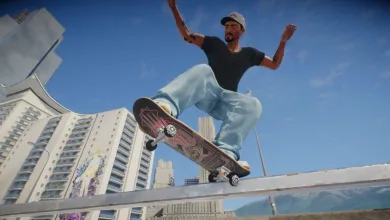
skate. puts ZexyZek in the spotlight this week
EA's May 12 Weekly Grind added the first Creator Collaboration Challenge, a Season 4 lighting preview, and a long bug list.

EA’s skate. Weekly Grind for May 12, 2026 put ZexyZek at the center of the game’s first Creator Collaboration Challenge series. The studio linked players to the event blog for the full breakdown.
The challenge set is built to be tough. EA said Zexy customized the tasks to test players, with the action spread across Isle of Grom and San Van. skate.Premium Pass members get unlimited Grom access, while non-members can buy a 24-hour San Van Water Taxi pass for 500 Rip Chips. Finishing every task list awards a deck, a hat, a shirt, and some pants, plus a special ZexyZek title.
There is one quick warning for anyone jumping in. EA said players who hit a crash when starting the challenges and have French or German VO selected should switch the in-game voice language to English for the Zexy event.
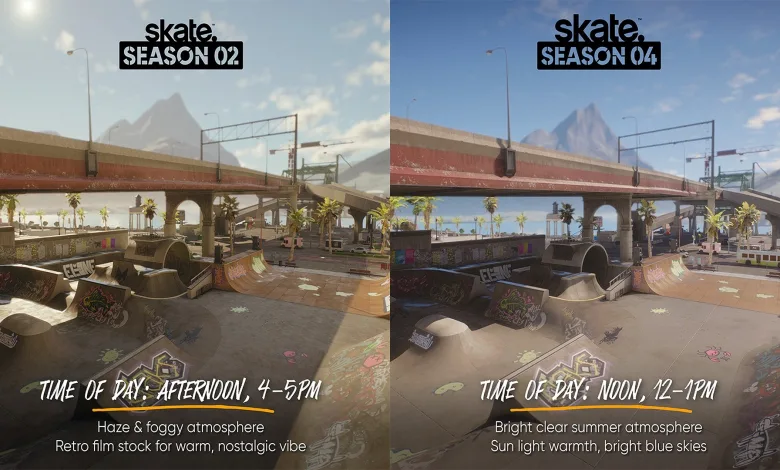
Season 4 is also getting a lighting pass. EA said San Van will move toward a brighter noon-style look with a different sun angle and a stronger vignette, while Grom already moved from sunset into nighttime in an earlier update. More Season 4 previews will arrive through the rest of May, and the Season 4 blog will drop on May 28.
The weekly calendar keeps the rest of the month busy. The Weekly Grind and the Creator Challenge both started on May 12, 2026, the four-part Discord sweep for Skate 3‘s birthday ran from May 10 through May 13, and a Have You Seen This Person? Screenshot Contest lands on May 20.
EA also reminded players that the free socks were already in inventories. The four community-made t-shirts stay available until June 2, 2026, and they came from Syph, Pariah, and Boolin, the winners of the T-shirt design challenge.
Community posts were part of the update too. EA pointed skaters to skate.reel for screenshots, clips, and videos, and it highlighted two community uploads:
EA also used the post to point players toward bug reporting and troubleshooting resources. It asked for new reports through the bug report forum and said a small number of PC crashes were tied to 13th and 14th Gen Intel processors. For more background, it linked to Raptor Lake instability details and Intel’s diagnostic tool. For AMD GPU issues, it pointed players to AMD’s driver site and the AMD Cleanup Utility.
Patch Notes
Developer’s Note: We’re seeing a small volume of crashes on PC related to 13th and 14th Gen Intel Processors. This is a thermal hardware issue with Intel processors, which Intel patched back in 2024, but if you were affected and didn’t download the patch in time, your CPU may be permanently damaged. This issue can cause crashes with high load applications, like video games. You can read more about the issue here and download a diagnostic tool here to see if your PC has this issue.
Known Issues Still Being Investigated:
- Month 3 task appears as Use Fast Travel Points instead of Grind or Manual Distance for non-English languages.
- The game crashes when loading into Isle of Grom.
- Duplicate Product Boxes appearing for all three neighborhoods in the store with an “Insufficient Funds” error if opened.
- Workaround: Traveling from San Van to Isle of Grom or vice versa resolves this.
- Some Trophies/Achievements are not registering progress if the requirement is done on Isle of Grom.
- Workaround: Trophies will progress when actions are taken on San Vansterdam instead.
- Adjusting your video settings on PC can cause other settings to change.
- Character texture flickers when the Pipe Dream challenge starts.
- Players cannot grind on the rails of the Stadium parking entrance.
- Sometimes when editing in the Replay Editor, players are unable to exit.
- Workaround: Press the L stick in to hide the UI, then again to show it. This should unstick the Replay Editor.
- Speedline challenges can end prematurely while in a sequence due to final bearing placement
- The notification denoting when a friend comes online can randomly trigger multiple times.
- After purchasing multiple SVB packs in succession, an error appears during checkout.
- Skater seems to pass through the board when having specific heights.
- The game sometimes crashes when a fourth player joins your Party.
- After accepting a skate. party invite via Xbox Live or PlayStation Network, the invite reappears after the player is already in the party they were invited to.
- Spin degrees in the trick feed are sometimes inaccurate.
- Graphical glitches are present in the UI on PCs using AMD GPUs.
- Workaround – AMD:
- Go to AMD’s driver site and find your graphics card from the “Search or Browse Drivers” section.
- Click on “Previous Versions” and download the one labeled “Adrenalin 25.12.1.”
- Download and Run the AMD Cleanup Utility.
- Reboot, and then run the Adrenalin 25.12.1 installer.
- Reboot again and launch the game.
- Workaround – AMD:
- Neighborhood Progress appears reset and previously opened product boxes appear locked.
- Workaround: Press Windows + R on your keyboard > Type: %localappdata% > Press Enter > Find the skate folder %localappdata%skate > Delete or rename the folder. (Rename the folder if you have saved replays or screenshots).
- Activity count on Isle of Grom zone entrance menu shows incorrect total amount of completed challenges.
- Flags on Isle of Grom unintentionally can cause your skater to bail.
- Coffin Air 540 in the Waterworks OTL Challenge often fails to register the goal as completed.
- Players often don’t receive notifications for completing and progressing tasks.
- Workaround: Visit the Task Menu and restart the game.
- Quick Ollie has incorrect height and forward boost when performed during grind.
- Players can hear pedestrians after turning the setting off.
- Returning to the session marker while ‘getting unstuck’ can get the player stuck on a black loading screen.
- Workaround: Restart the game.
- HUD disappears after starting a Challenge.
- Workaround: Restart the game.
- Performing a dark catch, followed by a grind and ending with a dark flip, won´t count as “flip trick to grind to flip trick” for challenge criteria on the challenge “Street Dreams”.
- Scorp tattoo has incorrect thumbnail.
Tell us what you think in the comments, and follow us on X, Bluesky, YouTube, Instagram.
Skate.
Developed by Full Circle
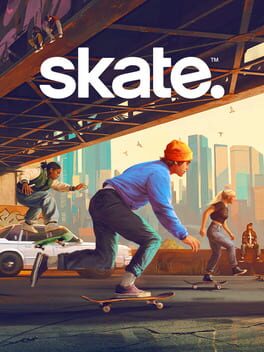
Refreshed with a forever vision in mind. Reimagined with the skate. community - you - guiding us through development. We’re listening to you. Join us on this journey and help shape the future of skate.
- Genre Sport
- Platforms Xbox Series X|S, PlayStation 4, PC (Microsoft Windows), PlayStation 5, Xbox One
- Perspective Third person
- Modes Single player, Multiplayer, Co-operative, Massively Multiplayer Online (MMO)
- Release September 16, 2025
- Publisher Electronic Arts
-
Age Rating