Astroneer Patch 1.38.7 cuts Megastructure costs, adds Megatech custom options and a Biodome scaling perk

System Era has released Patch 1.38.7 for Astroneer with a set of Megatech improvements, a broad recipe rework to lower construction costs for several Megastructures, multiple quality-of-life updates and a long list of bug fixes and legacy issue resolutions. The update also adds new Custom Game options for tailoring Megatech content and changes the Biodome Mega Oxygenator so its benefit scales with planted crops.
The developer highlighted that Megatech reached parity on Nintendo Switch, bringing that platform up to date. They also pointed players to the project’s Live Bug Tracker for ongoing transparency on recurring and legacy bugs.
Major highlights outside the full changelog include:
- New Custom Game modifiers for Megatech content, letting players tweak recipes, print speeds, Orbital Platform gravity, Biodome growth and wilting rates, and more.
- Recipe reductions for the Intermodal Terminal, all three Biodome stages and several Museum stages to reduce resource costs.
- The Biodome’s Mega Oxygenator now scales with the number of living plants planted within and can provide a full 100% reduction to planet-wide suffocation when the Biodome is full.
Astroneer Patch Notes 1.38.7
Another month and another patch is out, bringing some notable improvements and a lengthy list of bug fixes. And before we get into it, we have some updates to share.
For starters, Megatech finally saw its release on the Nintendo Switch last week! This brought the platform back into parity with all others and added all of the patches released for the game since the original Megatech release. As we hoped, this seems to have been a much smoother release, and there are still further improvements to be made in these monthly patches. If you’re a Switch player, don’t forget to claim your free anniversary hat in the EXO Outfitters store!
Another thing worth highlighting is that we made a final update to the Megatech Troubleshooting Report. At this point, most of the work going into Megatech is related to either fixing bugs or making improvements in response to the community’s feedback. For bugs, we’ll continue to use the Live Bug Tracker, which we’re now using to also track legacy bugs present before the release of Megatech. We want to continue using this tool to give more transparency into the work we’re doing, but do consider that this isn’t a fully comprehensive list of every bug we’re working on, just the ones that get reported the most or will have the most impact on players.
As for addressing feedback and implementing more quality-of-life improvements, we’ll continue to share news as we make progress, as there’s plenty that’s still being worked on. The Megatech Troubleshooting Report is no longer a good place to address this simply because its information would quickly fall out of date without regular updates. For example, we listed the feedback we’d received over the high cost of Megastructure recipes, and we’re already addressing that in this patch.
Another feedback item we listed was related to the Megastructures themselves. In this patch, we also include some Megastructure improvements made in response to player feedback, like the changes to the Biodome’s Mega Oxygenator that makes it so now its perk can scale and completely negate suffocation planet-wide. Let us know what you think about these changes, we’re curious to hear your feedback and look forward to sharing more of what we’re working on!
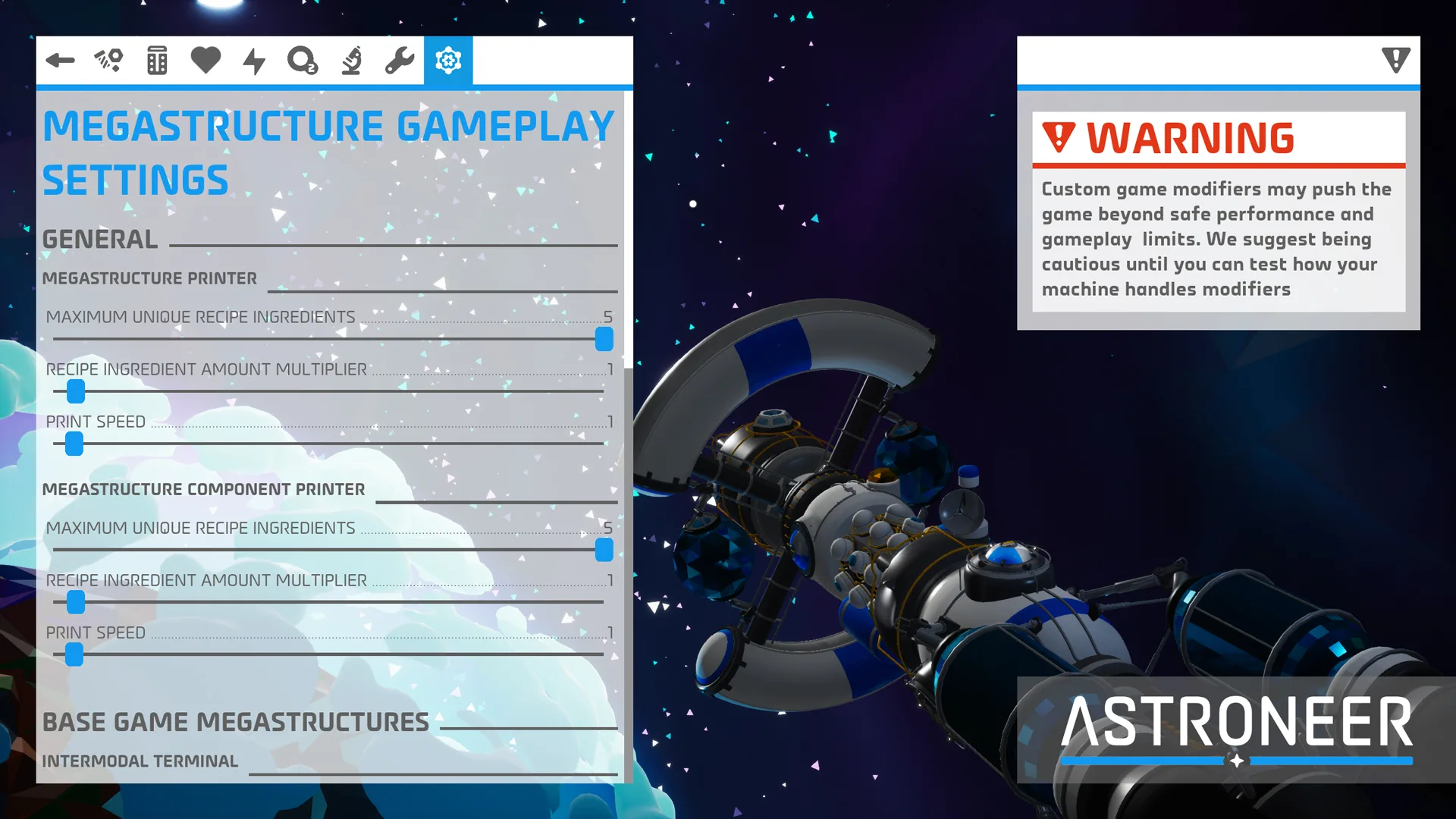
MEGATECH CUSTOM GAMES
With this update we’ve added new Custom Game options to tailor your gameplay experience with Megatech content to your liking. These settings include:
- Mega Printer Platforms & Megastructure Component Printers:
- Ability to adjust the recipes for Megastructures and their Mega Modules, both in the number of ingredient types in recipes and the quantities of required ingredients.
- Ability to adjust print speeds.
- Intermodal Terminal:
- Ability to set fuel in the integrated Hydrazine canisters to be infinite.
- Orbital Platform:
- Ability to adjust the limit to how many Mega Terrain Platforms can be chained together.
- Ability to adjust the intensity of gravity on the Orbital Platform.
- Biodome:
- Ability to adjust the growth rates for plants in the Biodome.
- Ability to adjust the wilting times and time for plants to die that are planted in the Biodome.
- Museum:
- Ability to adjust the requirements for donation milestones.
Note: Some Custom Game Modifiers can negatively impact performance and block access to parts of the game, including missions and items.
MEGATECH RECIPE REWORKS
We’re addressing the feedback that some Megastructure recipes were too costly, especially for Megastructures you can build multiples of like the Biodome or that have a function that’s dependent on having multiples like the Intermodal Terminal. We still want to ensure these construction projects represent a challenge while still being a worthwhile investment of resources, so we think these new values will strike a better balance, but please let us know what you think. We’ll be keeping a close eye on your feedback.
The following recipes have been changed:
- Intermodal Terminal:
- 50 Resin (Down from 150)
- 20 Aluminum (Down from 30)
- 10 Ceramic (Down from 30)
- 5 Steel (Down from 15)
- 2 Titanium Alloy (Down from 5)
- Biodome Stage 1:
- 100 Resin (Down from 250)
- 150 Organic (Unchanged)
- 30 Steel (Unchanged)
- 40 Glass (Unchanged)
- 40 Ammonium (Down from 100)
- Biodome Stage 2:
- 100 Resin (Down from 150)
- 20 Graphene (Down from 25)
- 20 Aluminum Alloy (Down from 30)
- 75 Glass (Down from 150)
- 80 Nitrogen (Down from 160)
- Biodome Stage 3:
- 150 Resin (Down from 300)
- 20 Rubber (Down from 30)
- 20 Plastic (Down from 30)
- 50 Glass (Unchanged)
- Museum Stage 1:
- 200 Compound (Down from 300)
- 30 Copper (Down from 50)
- 30 Glass (Down from 50)
- 15 Silicone (Unchanged)
- 10 Titanium Alloy (Unchanged)
- Museum Stage 2:
- 50 Compound (Unchanged)
- 30 Silicone (Unchanged)
- 30 Rubber (Unchanged)
- 20 Aluminum (Down from 30)
- 5 EXO Chip (Down from 10)
BUG FIXES
Megastructures
- Fixed an issue that would cause the placement of Construction Anchors to mistakenly show as invalid despite being on valid terrain.
- Fixed an issue where Megastructures were forced to be placed at the same elevation as the Construction Anchor. The preview hologram will now better match the terrain alignment it’s placed on.
- Fixed an issue that would cause the preview hologram of Construction Anchors to always display red if they were spawned but never picked up before saving and exiting the game, though this would get fixed by interacting with its buttons.
- Fixed an issue that would prevent the preview hologram from displaying when picking up a Construction Anchor for the first time.
- Fixed an issue that could cause a Construction Anchor to spawn upside down if the player wasn’t looking when it landed on the landing pad.
- Fixed a multiplayer issue where the Megastructure Component Printer could fail to display a recipe and instead simply replace ingredient names with the word “Ingredient”.
DLS:
- Fixed an issue that could cause the button prompt on the tooltip for the DLS Construction Anchor tubes to not display after saving, exiting, and reloading a game.
- Fixed an issue that would allow resources to be slotted into the DLS Mega-Component Printer despite not being called for by a recipe.
- Fixed an issue where non-host players in multiplayer were unable to load or unload Construction Anchors from the DLS with a controller using the prompted interaction button but were still able to do so with the trigger button.
- Fixed an issue where the DLS model shown while the Megastructure is being printed was an older version of the final DLS model.
Intermodal Terminal:
- Fixed a game crash that could be triggered by unpacking a shuttle on an Intermodal Terminal.
- Fixed an issue with the Intermodal Terminal’s Rail Station Control Panel displaying the incorrect text string for its Tier Mode setting.
- Fixed an issue that could cause resources in canisters slotted into an Intermodal Terminal’s integrated Rail Station to move to the shuttle on its associated landing pad even after moving the shuttle and canister off of the Intermodal Terminal.
Orbital Platform:
- Fixed an issue preventing Repeaters and Power Sensors from drilling into the surface of the Orbital Platform.
Biodome:
- Fixed an issue where using a Mega Deconstructor on a Biodome would leave behind all plants within standing. Now, plants turn back into seeds that can be recovered.
- Fixed an issue where seeds could be planted in an occupied plot in the Biodome Expansion under certain circumstances.
- Fixed an issue where some of the oxygen display lights on the outside of the Biodome would not light up correctly.
Museum:
- Fixed an issue that would prevent players from claiming their rewards after reaching the third milestone in donating power or bytes.
- Fixed an issue that was preventing Storm Data from being able to be donated as a resource for the Museum.
- Fixed an issue where tapping the interaction key/button while holding the cursor over the Display Case Platform would also activate your Backpack’s auxiliary slot.
- Fixed an issue where packaged Display Cases and Display Case Platforms didn’t display the correct icon.
- Fixed an issue preventing Display Cases from being repackaged after unpackaging.
- Fixed an issue preventing packaged Display Cases slotted into a platform from being unpackaged.
- Fixed an issue where the tooltip that shows while holding the cursor over the Museum didn’t include the Museum icon.
- Fixed an issue where the Galastropod collection could still be activated on a Display Case Platform if the displayed shells were consumed for research directly from the Display Case.
Miscellaneous
- Fixed an issue that would mistakenly pop up the “Completed Megatech” message every time you enter the main menu for players who own the Megatech DLC.
- Fixed an issue where Nubcap seeds could grow into Conepod plants.
- Fixed an issue preventing platforms from attaching to the surface of the Unidentified Satellite and Sun Room.
- Fixed an issue where Hydrazine Canisters slotted into a Shuttle’s Oxygenator slot would not refuel Hydrazine Thrusters if they were set to Enable Output.
- Fixed an issue where players could get stuck indefinitely when trying to load into a game on dedicated servers.
- Fixed an issue that could cause Wheezeweed vegetation to rapidly flicker in and out of view when approached.
- Fixed an issue where packaged Melodic Mushrooms didn’t display the correct icon.
- Fixed an issue where the Mega-Mini Training Shuttle could display a placeholder hologram in Creative Mode when selecting it in the research catalogue or while being printed.
- Fixed a UI issue on the Xbox for PC App where the displayed keys/buttons to close an Astropedia entry would show the corresponding buttons for every platform.
- Fixed an issue where the Power settings UI in a Custom Game’s configuration menu within the Astropedia would be slidable instead of static.
- Fixed an infinite oxygen exploit.
Legacy Issues
- Implemented a fix for a legacy issue where placing two or more Proximity Repeaters close to each other could prevent non-host players from rejoining a multiplayer game.
- Implemented a fix for a legacy issue that could cause some players to not receive their final set of rewards for completing the Glitchwalkers final story mission.
- Fixed a legacy issue where resources produced by a Portable Smelter that would later get moved over to an open slot would be missing their tooltip.
- Fixed a legacy issue where the main menu’s right-side panel would still show the Glitchwalkers DLC as “Not Owned” after buying the DLC.
- Fixed a legacy issue where part of the Shelter handle was missing when seen through the opened hatch door window.
IMPROVEMENTS
- Changed the functionality of the Biodome’s Mega Oxygenator so that its benefit now scales with the number of living plants planted within. A full Biodome will now provide a 100% reduction to the planet-wide suffocation rate. Plants planted in Biodome Expansions will also contribute to this scaling, but it cannot exceed 100%.
- Updated Icon Signs so that now all icons will be mirrored on either side, so now you can use the arrow icons to give directions no matter where you look at them from.
- Changed how Display Case Platforms work so that you can now stack perks with multiples of the same collection. The associated collection perk will have its effect increased for each active full collection, but the effect will have diminishing returns, with each new collection providing half the benefit of the last one.
- Added the power consumption rates to tooltips for Display Case Platforms with full collections.
- Added collision to the yellow railings around the edges of the Orbital Platform for added safety, but you can still jump over them.
- Made changes to how Megastructures get placed down so that they now clear all foliage and debris, making them easier to deploy.
- Made improvements to the UI of the Megastructure Component Printer’s Control Panel.
- Added new icons for packaged Megatech items.
- Changed the color of the Megatech icon next to save files to be light blue instead of the previous magenta.
- Made various animation improvements.
KNOWN ISSUES
The following issues were identified late into the review process for this update and will be addressed in our next patch in April.
- In multiplayer, when a player places a Walkway post and then quick stows it to their backpack, collision will remain for non-host players. This can be reset by saving and reloading.
- The Simulated Aquarium is no longer showing in the Research Catalog, preventing players from unlocking it or placing it down in Creative Mode unless through the use of a Small Printer Cheat Plinth. If you’ve already unlocked it, then it can still be printed as normal.
We look forward to hearing your feedback on the latest changes! Keep an eye on our Live Bug Tracker to check the status on other bugs present in the game, and if you run into an issue that isn’t listed or you have more information to share, please send a bug report to the team.
Share your thoughts about the Biodome scaling and the recipe reductions in the comments, and follow us on X, Bluesky, YouTube, Instagram.
Astroneer: Megatech
Developed by System Era Softworks