Phasmophobia 0.20.0.0 Adds Dowsing Rods and a Lighting Overhaul
Resonance moves Phasmophobia to Unity 6, adds new performance and camera settings, and changes several Ghost behaviors.

Phasmophobia v0.20.0.0, the Resonance update, is now available across all platforms. The release brings the game to Unity 6, revises its lighting, adds investigation tools, and includes a broad set of gameplay and stability fixes. Kinetic Games published the full Steam patch notes.
The update had been scheduled for November 24, with its Unity 6 transition and new investigation features previewed in the earlier Resonance plans. The final release adds quality presets, an Extreme shadow setting for compatible hardware, and a toggle for the Live Camera Feed on Photo and Video Cameras. Turning the feed off still leaves the Media highlight visible on the camera.
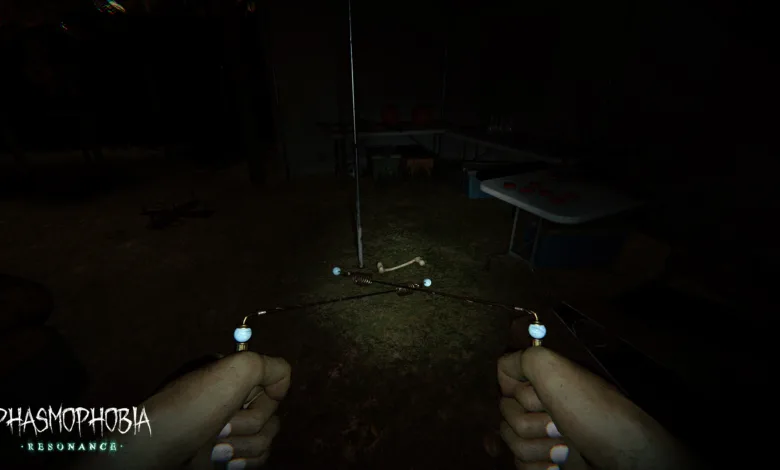
Investigators can use Dowsing Rods to locate the Bone, with higher tiers offering greater accuracy, including information about which floor it is on. Sound Sensors now mark detected sounds on the Truck map, using different pings for a single sound and a looping one. The map only reflects sounds within the placed Sensor’s range.
Voice Recognition gains new prompts for asking Ghosts to interact or show their presence. They replace the former method of saying certain words or the Ghost’s name in an attempt to raise activity, and a Journal page now includes the new phrases. Map voting has also been reworked: groups can build a random pool from as many maps as they want, select small, medium, or large locations, or use a randomizer.
New visual options include color-blind settings and two Eye Adaptation modes. PC players can choose Performance or Quality, although hardware that cannot support Quality will switch to Performance automatically. Consoles use Performance, and VR and low-end hardware only support that setting. The update also adds more language support for PlayStation 5 and Xbox Series X|S.
On Xbox, Phasmophobia is now part of Xbox Play Anywhere. Save data carries between supported Xbox devices, including Xbox Series X|S, PCs, laptops, and ROG Ally. The update also adds in-game warnings for Code of Conduct violations and notifies players when action is taken on a report they submitted.
Phasmophobia v0.20.0.0 Patch Notes
New
- Unity 6: The move to Unity 6 brings with it improvements across the board for Phasmophobia including performance, stability, lighting and more. Phasmophobia also now supports various different quality presets for in-game systems and different platforms such as Steam Deck. Importantly, this update brings with it a host of bug fixes, all of which can be found below.
- Performance Improvements & New Options: Unity 6 and its accompanying features has improved Phasmophobia’s performance and stability through notable changes. Resonance addresses commonly encountered crashes, improves CPU, GPU, VRAM and RAM usage as well as allowing for new overall quality presets. Elsewhere, a new Extreme shadow setting for compatible hardware has been added and an option to turn off/on the Live Camera Feed (for Photo & Video Cameras) is now available. Note: If Live Camera Feed is turned off, the Media highlight will still appear on the Camera.
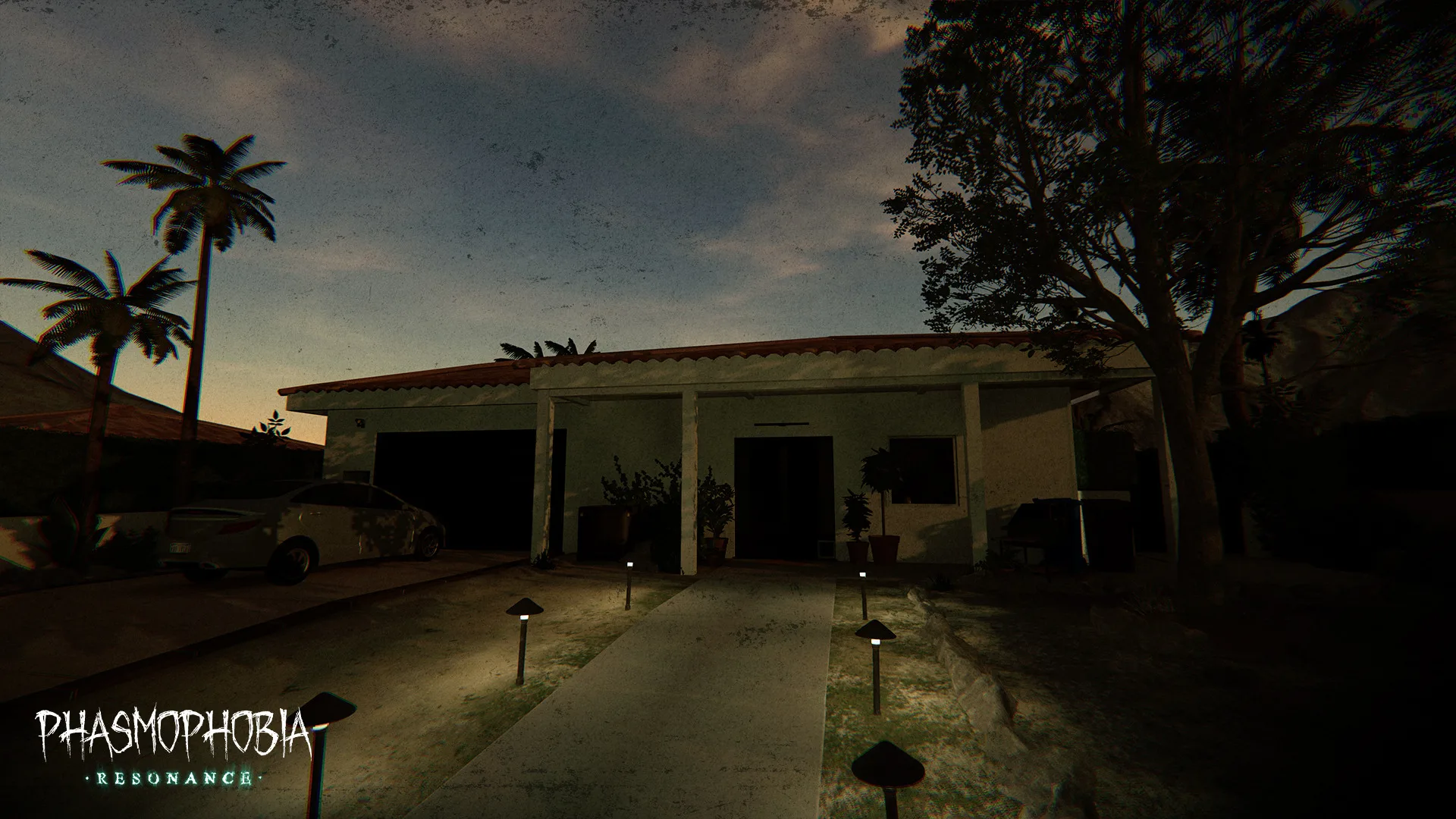
- Lighting Improvements: As detailed in the recent Development Preview, Resonance brings with it an overhaul to the overall lighting system in Phasmophobia. These changes will be notable during all weather types where darker areas of a location will be lit through windows and doorways, and outside areas will be brighter. Areas of improvement also cover lighting on dynamic objects such as props and doors; originally, an interactable would be lit in a different way to others whereas now these will blend with the rest of the environment.
- Voice Recognition Improvements & Changes: In Resonance, we’ve made additions to Voice Recognition to allow for a more immersive experience with new options allowing players the chance to ask for interactions or proof of presence from the Ghost. An additional page in the Journal has been added too, listing off various line options. These new options replace the ability to say certain words or the Ghost’s name to try and increase Ghost activity.
- Sound Sensor Map: Once a Sound Sensor has been placed down inside a location, an icon on the Truck’s map will reflect the type of sound as and when it happens. These will ping differently depending on if the sound is a single sound or a looping sound. A sound can only be picked up if it is happening within the range of the Sensor itself.
- Dowsing Rods: The Dowsing Rods are a new piece of Equipment used to locate the Bone during any Contract. Designed mainly for use on larger maps, the Dowsing Rods will point players towards the Bone, with higher tiers providing better accuracy such as which floor the Bone can be found on.
- Map Voting: The Map Voting system has been reworked to allow for a more customised approach for players. Players are now able to select as many maps as they wish to create their own random map pool. Buttons on the Contract board can be used to select all small, medium and large maps separately as well as a randomiser that works in the same way as the original Random polaroid did.
- Colour Blind options: Various different Colour Blind options are now available. These can now be found within the Settings > Video menu and support the following types of colour blindness: Protanopia, Protanomaly, Deuteranopia, Deuteranomaly, Tritanopia, Tritanomaly, Achromatopsia, Achromatomaly.
- In-Game Warnings: As we continue to improve the overall experience for players in Phasmophobia, a new Warning system has been implemented. Initially, these will provide warnings for violations of our Code of Conduct, but we’ll continue to evolve this system as we go. If action is taken against a report, the player who made the report will now receive a notification informing them that it has been successful.
- XBOX Play Anywhere: Phasmophobia is now available as part of the XBOX Play Anywhere program, allowing players to play the game across the devices that support XBOX – PC, laptops, ROG Ally and XBOX Series X/S. Save data will carry across your devices, meaning you can switch between any XBOX system and retain your progress.
- Console language support – Additional language support for PlayStation 5 and XBOX Series X/S has been added. The following languages are now supported on all platforms: English, German, French, Italian, Bulgarian, Czech, Danish, Dutch, Finnish, Greek, Hungarian, Japanese, Korean, Norwegian, Polish, Romanian, Russian, Simplified Chinese, Swedish, Traditional Chinese, Turkish, Ukrainian, Catalan, Arabic, Spanish (Latin America), Portuguese (Portugal), Spanish (Spain), Portuguese (Brazil).
- Eye Adaptation: A new Eye Adaptation setting, Performance, has been added for all players, including VR. The previous On option is now changed to Quality. Note: VR and low end hardware only support the Performance setting.
Changes
Ghost Changes
- A Yurei will now open and close doors during Hunts.
- A Yurei’s normal interactions with doors are now slightly faster than other Ghost types.
- During a Hunt, a Yurei moves doors faster than other Ghost types.
- A Poltergeist now has a chance to either throw or interact with objects, rather than only throwing, while still retaining a higher chance to throw objects than other Ghost types.
- A Goryo will no longer change rooms if the ”I Wish For Sanity” Monkey Paw wish is used.
- In Settings, ‘Cursor Color’ has been changed to ‘Reticle Color’.
- Players using controllers can now switch CCTV tabs in the Truck with DPAD arrows.
- The Contracts board now reads as ‘Vote on Contracts’ due to the addition of improved map voting options.
- Players who have received a Ban will now have their Cross-play settings locked to ‘Disabled’.
- PC players now have the option to choose between Performance & Quality modes for Eye Adaptation. If the player’s hardware is unable to support Quality, this will be automatically set to Performance. Note: Consoles will have this automatically set to Performance.
- The Truck map will now display the relevant map if on a Restricted variant.
- Players on consoles will now be able to change their Cursor color.
- Instead of being presented with a ‘Game Full’ message after being invited, the player will now be informed the current Contract is ongoing and to attempt to join once it is finished.
- When calibrating height in PSVR2, ‘Trigger’ has been changed to ”L2 and R2”.
General Fixes
- Fixed an issue that caused visual stuttering across the game.
- Fixed an issue that prevented Stamina from regenerating if the Journal is opened while sprinting.
- Fixed an issue that would retain resolution changes despite ‘No’ being selected or the timer running out.
- Fixed an issue that prevented the player from using the Main Menu after launching a fresh save.
- Fixed an issue where a screen regarding Progression 2.0 would incorrectly be displayed for players.
- Fixed an issue where Event multipliers would double insurance payouts.
- Fixed an issue that caused slower than intended loading for Character Customisation if the player left the previous Contract via the Journal.
- Fixed an issue that allowed photos to be taken through a closed door via the gaps in the doorframe.
- Fixed an issue that caused the rewards multiplier text to not display as red when custom settings are changed.
- Fixed an issue where, if a player joins the room while a contract is loading, the players currently in the Contract will be stuck in the Truck and the player who recently joined will be stuck in the Warehouse.
- Fixed an issue that caused visual errors in the Custom Difficulty menu if the player is scrolling with a trackpad.
- Fixed an issue that caused text to not display correctly if the language is changed.
- Fixed an issue where ‘EVIDENCE’ would display on the CCTV cameras in the Truck instead of the Evidence type.
- Fixed an issue that caused lighting to appear differently to a player if they are revived when playing with Sunrise weather.
- Fixed an issue where ”Missing Localisation Key: Evidence_Doll” would display in the Journal after recording a doll’s laughter.
- Fixed an issue that prevented non-host players from using the Boombox in the Warehouse after returning from a Contract.
- Fixed an issue that caused information on Rewards to not disappear from the Menu board if the player exits the Menu.
- Fixed an issue where the player could sell the same single piece of Equipment twice.
- Fixed an issue that caused visual ghosting if TAA was set as the chosen Anti-Aliasing setting.
- Fixed an issue that caused doors to slowly slide away from their original positions.
- Fixed an issue that caused players to be able to see their own body in recorded evidence if they had died.
- Fixed a readability issue with the Journal if FidelityFX Super Resolution was active.
- Fixed an issue that occasionally caused visual issues when sprinting and crouching. https://kineticgames.atlassian.net/browse/PHS-10779
- Fixed an issue where dead players may observe visual issues when stood in doorways.
- Fixed various instances of missing localisation text.
Ghost Fixes
- Fixed an issue that allowed Ghosts to open doors the incorrect way on several maps.
- Fixed an issue that allowed the Ghost to begin a Hunt in a hiding spot.
- Fixed an issue that caused the Ghost to only appear for a single frame during some Ghost Events.
- Fixed an issue that caused some Ghost Events to not always be visible to players.
- Fixed an issue that caused Obake shapeshifting to not count towards completion of the Apocalypse III challenge.
- Fixed an issue where, if Incense was used on a Gallu, and it then disturbed Salt, only the host player would be able to see the affected Salt.
Equipment/Item Fixes
- Fixed an issue that caused the player character’s hands to jitter while holding Equipment.
- Fixed an issue that caused Equipment to jitter while the player was crouched.
- Fixed an issue that caused the Salt highlight to follow the player’s hand motion when attempting to place Salt.
- Fixed an issue that caused the player to become softlocked if they used Tarot Cards after toggling a Firelight with the Special button (T on Keyboard or Down on controller).
- Fixed an issue that caused the Summoning Circle to not work correctly if lit with a Firelight, resulting in no Cursed Hunt or Ghost Event.
- Fixed an issue that prevented a revived player from interacting with anything if they died while using the Haunted Mirror.
- Fixed an issue that prevented a Video Camera from being placed back on to a Tripod if it was knocked off by the Ghost.
- Fixed an issue that prevented a Camera registering a Dead Body for a short while after deleting a piece of Evidence from the Photo tab.
- Fixed an issue that prevented the Use animation for the Firelight from being cancelled by pressing Use again.
- Fixed an issue that allowed the Video Camera to record its own interaction if grabbed while being thrown by the Ghost.
- Fixed an issue that caused the incorrect Equipment audio to play when the player uses a Tier 1 Photo Camera.
- Fixed an issue that caused Tier 1 Igniter audio to play if using Tier 1 Sanity Medication while the Igniter is in the inventory.
- Fixed an issue that caused the Tier 2 Headgear’s lightbulb to appear on, but no light would be emitted.
- Fixed an issue that caused Equipment to clip through the Journal after toggling on/off Headgear.
- Fixed an issue that caused Equipment to not be able to be picked up if another non-grabbable prop is on top of it.
- Fixed an issue that caused held Equipment to appear during Headgear toggle animation.
- Fixed an issue where, if FOV is set to 90, Tier 2 Sound Recorders would appear when using Tier 3 Headgear.
- Fixed an issue that caused visual inconsistencies with the sound waves of a Tier 2 Sound Recorder when multiple sounds are picked up.
- Fixed an issue that displayed two waveforms for a single piece of audio recorded with the Sound Recorder.
- Fixed an issue that caused the Tier 3 Igniter to animate if toggling on/off any tier of Headgear.
- Fixed an issue where all lights (Flashlight, D.O.T.S Projectors, UV) are On when starting Training.
- Fixed an issue that allowed players to interact with a used Incense when holding an active Igniter.
- Fixed an issue that caused Cameras attached to Tripods to clip through the floor if the player holding them died.
- Fixed an issue that caused the flame of a Tier 3 Igniter to be visible through the lid.
- Fixed an issue that caused SFX of any tier of Crucifix to not play if held by a player.
- Fixed an issue where cycling through to Tier 1 and 3 UV Lights would play audio but not show as active. If the UV Light was then dropped and picked back up, it would activate/deactivate depending on the state it was dropped.
- Fixed an issue where the audio of a Ouija Board breaking cut off prematurely.
- Fixed an issue that caused doors to become detached from their hinges if hit with the Ghost Writing Book.
- Fixed an issue that could cause the Tier 2 Firelight to not light in cover if extinguished in the rain.
- Fixed an issue where hold-to-use Equipment animations (eg. Sound Recorder) would break if the Equipment was picked up after opening and closing a Journal.
- Fixed an issue that caused EMF reading audio to be played at a higher pitch than intended if heard via a Sound Sensor.
- Fixed an issue where a Tarot Card would become attached to a dead player if they died during the Tarot Card animation, remaining visible to players still alive.
- Fixed an issue where, if holding a Flashlight when dying after using a Tarot Card, light would be emitted from a dead player.
- Fixed an issue that stopped audio from a Tier 3 EMF Reader playing if the Journal is opened and closed while a reading is being picked up.
- Fixed an issue that caused used Tier 2 Sanity Medication bottles to flicker.
- Fixed an issue that caused issues with Equipment animations if any tier of Sanity Medication was used, the player cycled back to it, and used again.
- Fixed an issue that caused a player’s arm to visibly twitch while holding a Flashlight if that player switches Equipment.
- Fixed an issue that caused Equipment position to change if the FOV setting was changed.
- Fixed an issue that caused the Haunted Mirror to have no audio if it was dropped outside and picked back up and used.
- Fixed an issue that caused the Flashlight to remain in-hand if the player picked up either the Haunted Mirror or Ouija Board while using it.
Location Fixes
- Fixed an issue that prevented PC and VR players from ringing the bell outside of Point Hope, meaning the Ferryman of the Drowned Easter Egg could not be completed.
- Fixed an issue that caused the UV Evidence on Grafton Farmhouse to be visible, even if it is not one of the required Evidence types.
- Fixed an issue where the Drill in the 6 Tanglewood Drive garage could only be turned on/off when held.
- Fixed an issue that caused the door and ceiling in the basement of 13 Willow Street to flicker and turn black.
- Fixed an issue that caused the door to the warden’s office in Prison to make no sound when it is fully closed.
- Fixed an issue that allowed Equipment to be placed on an invisible wall in the Orange Bedroom on 42 Edgefield Road.
- Fixed an issue on 6 Tanglewood Drive where the cupboard door in the Garage would open incorrectly.
- Fixed an issue where the player could become stuck in the Utility Room of Sunny Meadows, even after death.
- Fixed an issue on 6 Tanglewood Drive where the Master Bedroom’s lamp light would bleed into the hallway.
- Fixed an issue where the player could become stuck in the Locker Room of Brownstone High School.
- Fixed an issue on Prison Restricted where Equipment could be lost if thrown into the blocked off areas.
- Fixed an issue where the player could become stuck in the ensuite bathroom of 6 Tanglewood Drive.
- Fixed an issue that allowed the player to climb on top of the lockers in the main corridor of Brownstone High School.
- Fixed an issue that caused audio from all doors in Nell’s Diner to be louder than intended.
- Fixed an issue that caused audio from all Bleasdale Farmhouse’s cupboard and 10 Ridgeview Court’s closet doors to be louder than intended. /
- Fixed an issue that caused the Fingerprints on the fridge door of 6 Tanglewood Drive to float if opened.
- Fixed an issue on Point Hope that caused blocked player progression should the wash bucket be moved in the way of the player.
- Fixed an issue on Point Hope where Camera screens would go black if pointed over the railings.
- Fixed an issue where the Bone could spawn in a Hiding Spot of Point Hope, possibly preventing the player from collecting it if the Hiding Spot was blocked off.
- Fixed an issue that prevented the Yurei from closing all open Prison doors during a Monkey Paw ”I Wish For Activity” wish.
- Fixed an issue where a Tier 1 Thermometer could be dropped into the car hood in 6 Tanglewood Drive and become irretrievable.
- Fixed an issue on Maple Lodge Campsite that caused the Sound Sensor to display on the incorrect floor on the map in the Truck.
- Fixed an issue that caused the beach fire ‘UV’ sign to not be visible on Point Hope.
- Fixed an issue where audio from a Sound Sensor would not be played if the Sensor was placed in the Bleasdale Farmhouse attic.
- Fixed an issue that allowed players to climb on top of furniture in the Manager’s Office of Sunny Meadows.
- Fixed an issue on Bleasdale Farmhouse where the Yurei’s ability would not be possible on the main door of the Study.
- Fixed an issue on Grafton Farmhouse that caused distorted lighting on various walls and surfaces.
- Fixed an issue that caused CCTV camera feeds in Bleasdale Farmhouse to flicker when viewed in the Truck.
- Fixed an issue where the player could become stuck on the trash can in the Staff Hallway of Nell’s Diner.
- Fixed an issue where the Ghost was unable to open toilet lids in 6 Tanglewood Drive.
- Fixed an issue that caused unintended movement of the BBQ lid in 6 Tanglewood Drive’s garage when the Ghost interacted with it.
- Fixed an issue where the discoverable Tier 1 Igniter in Point Hope would not function correctly.
- Fixed an issue that prevented the boilers in Sunny Meadows from being lit with an Igniter.
- Fixed an issue that allowed a video recording of a Ghost to complete the ‘Capture Video’ objective despite the Media page being full.
- Fixed an issue on Prison that caused a gap between the jail door and its hinges in the Main Hallway.
- Fixed an issue on Prison that allowed the Ghost to walk through tables.
- Fixed an issue that caused the player to become stuck if revived near a blockade in Brownstone High School Restricted.
Player Fixes
- Fixed an issue that caused the player’s character to be pulled into walls when close.
- Fixed an issue that caused movement to be registered when using Text input, resulting in footsteps being heard or Sanity being drained.
- Fixed an issue in Multiplayer that caused another player’s journal to appear floating in front of their character.
- Fixed an issue that caused the player character’s thumb to clip through the Journal if FOV was set to 90.
Console Specific Fixes
- Fixed an issue where XBOX players could not be heard by players on PC or PlayStation 5/PSVR2 while in the Warehouse.
- Fixed an issue where players using a controller could not bind the Drop action to a different input.
- Fixed an issue that prevented auto-aim for controllers not working correctly for light switches on Camp Woodwind and Maple Lodge Campsite.
- Fixed an issue where, if the player is using a controller, the Cursor would be reset to its default position when navigating any non-Journal menu.
- Fixed an issue where Text input options would be displayed for Voice Recognition despite the player’s recognition settings being set to ‘Voice’.
- Fixed an issue on XBOX where the screen of the Tier 1 Video Camera would display static instead of the expected image in Training.
- Fixed an issue on Sunny Meadows where Sanity would drain despite the player being outside the investigation area.
- Fixed an issue that caused the case number in the Journal to not match the one displayed in the Truck.
- Fixed an XBOX issue where the Main Menu would become unresponsive after exiting the Multiplayer menu or accepting the EULA for the first time.
- Fixed an issue where XBOX D-pad buttons would become unresponsive in the Singleplayer menu.
- Fixed an issue where, if an XBOX controller was disconnected, there would be no notification for the player.
- Fixed an issue on XBOX where the player character may become unresponsive at the start of a Contract.
- Fixed an issue where the XBOX ‘A’ button may become unresponsive after using Tier 1 or 2 Video Cameras.
- Fixed an issue where the XBOX players would be unable to interact after using Tier 1 Firelights.
- Fixed an issue that caused footstep audio to be heard by other console players while a player navigates the Journal.
- Fixed an issue where the correct controller icons would not appear in menus and other areas such as Training.
- Fixed an issue where PS5 players were not kicked from the local game session after disconnecting from the server.
VR Fixes
- Fixed an issue that prevented VR players from using Photo and Video Cameras if another item was held in their right hand.
- Fixed an issue that caused some areas of Point Hope to be inaccessible with Teleport movement.
- Fixed an issue where you could drop items onto the VR belt to holster them which caused several bugs.
- Fixed an issue that prevented players teleporting to certain areas in Training.
- Fixed an issue that prevented players from running out of Tarot Cards.
- Fixed an issue where objects thrown by dead VR players would not be visible for other players.
- Fixed an issue that prevented players from inserting coins into the Arcade Machine in Nell’s Dinner, meaning the Ghost in the Machine Easter Egg could not be completed.
- Fixed an issue that caused Easter Egg props in Nell’s Diner to not be held correctly by the VR player’s hand.
- Fixed an issue that caused the reticle for the Lantern room’s cabinet (needed to complete Ferryman of the Drowned) to display on the incorrect part of the door.
- Fixed an issue that caused holstered Tier 3 Firelights to appear high-up on a VR player for other players.
- Fixed an issue where the flame from a lit Tier 1 Firelight would become separated from the candle.
- Fixed an issue that prevented players from placing any Easter Egg related prop in Nell’s Diner and Point Hope.
- Fixed an issue that caused the belt to lower at a slower speed than the player when pressing the crouch button.
- Fixed an issue that caused the player to become stuck on the pool table in the games room of Point Hope.
- Fixed an issue where a player’s in-game body would not follow their head movements in real life.
- Fixed an issue that caused the Tripod to not open correctly unless it was held upright when dropped.
- Fixed an issue that allowed players to Teleport behind the mirror in the Master Bedroom of Point Hope.
- Fixed an issue that prevented players from teleporting on/to stairs in Point Hope.
- Fixed an issue that allowed the player to clip out of 6 Tanglewood Drive’s bathroom by crouching and moving their head in real life.
- Fixed an issue where Sound Sensors would be dropped when the player attempts to switch them to another hand.
- Fixed an issue where if a player teleports into a building, the exterior audio would continue to play and overlap with the interior audio.
- Fixed an issue that caused the Tripod to be placed on the roof of the Truck if held upside down.
- Fixed an issue for PSVR2 players where the player’s position would not be reset when holding Options.
Which Resonance change will affect your investigations most? Follow the continuing changes to Phasmophobia’s Ghost tools and lighting on X, Bluesky, YouTube, Instagram, Steam, and Telegram.
Phasmophobia
Developed by Kinetic Games
Phasmophobia is a cooperative horror investigation game played from a first-person perspective, supporting one to four players. Players take on the role of ghost hunters who must identify the type of ghost haunting a designated location by gathering evidence using various paranormal investigation equipment. The game features speech recognition, allowing ghosts and certain equipment to respond to words spoken by players. As investigators spend time at the site, their sanity decreases, eventually triggering hunts during which the ghost actively pursues and can kill players. The game includes multiple location types of varying size, twenty-nine ghost types each with unique behaviors and evidence, and a progression system where players earn money to unlock and upgrade equipment. Virtual reality is optionally supported.
- Genre Puzzle, Tactical, Indie
- Platforms Xbox Series X|S, PlayStation VR2, Windows Mixed Reality, Nintendo Switch 2, PC (Microsoft Windows), SteamVR, PlayStation 5, Oculus Rift
- Perspective First person, Auditory, Virtual Reality
- Modes Single player, Multiplayer, Co-operative
- Release September 18, 2020
- Publisher Kinetic Games
-
Age Rating