Sidetrack Games released Update 242 for PAYDAY 2 on December 18, 2025. The patch is about 150 MB and focuses on restoring missing voice work for Wolf, broadening Steam inventory skin compatibility between single and akimbo weapon variants, and tightening DLC and anti-cheat checks across Steam and the Epic Games Store.
The update also targets a wide range of gameplay and stability issues: enemy spawn timing has been corrected, civilian and guard AI pathing and animations were adjusted, a VR-related shader crash was fixed, and several weapon and UI bugs were addressed. Modders get expanded override support but are warned that some changes may be incompatible with existing mods.

For a wider view of recent franchise updates, see the consolepcgaming coverage of PAYDAY 3 Update 2.5.
Patch Notes – Update 242
PAYDAY 2: Update 242 Changelog
Hello again heisters!
To start with, we want to take a moment to express our gratitude and happiness for the warm welcome by everyone. Thank you guys! All the extra feedback we’ve been getting has been really useful in knowing what quality of life improvements players (and modders) actually want. Keep it coming, we’re listening!
We’ve taken a careful look at the anti-cheat and DLC checks for both Steam and Epic platforms and have been hard at work making sure you get what you own. If you have DLC issues still please make a bug report forum post so we can fix it.
On-top of all that we got you a few holiday presents as well, so lets start with those!
PAYDAY 2: Update 242 Changelog
Update Size: 150 MB
Wolf has been released from custody
Wolf has unfortunately been neglected for a while, with a lot of missing lines and even some obvious splices that have been joked about in the community for a long time.
But it’s time to change that a little bit! Ulf Andersson (With the help of Simon Viklund!) have agreed to pull out the mic one more time to give Wolf another shot. A massive thanks to both of them making this happen.
- Added new Wolf voicelines for marking and killing Medics, and also marking Turrets and Captain units
Steam Inventory
Ever had a skin you liked, but you only used its akimbo version which the skin wasn’t available for? This arbitrary limitation has now been removed, letting you use a skin on both single and akimbo versions of guns.
- All previously akimbo-only weapon skins, can now be applied to their single-hand versions
- All previously single-hand only weapon skins, can now be applied to their akimbo versions
General
- Zipline motors are now color coded based on their behavior:
- Orange motors are for lootbags, blue motors are for players. This change is in preparation for a future usability improvement.
- Improved the hair physics on Clover to not glitch out as often
- Implemented missing transitional animation when a player goes from Bleedout to Fatal states
- Fixed an unrolling loop shader issue that could lead to a GPU driver crash on parallax shaders
- In layman terms, VR players should crash less now
- Fixed Epic/Steam crossplay cheat detection for Alienware Alpha Masks and Melee items
- Fixed Epic Game Store players not being awarded items from the Official Soundtrack, the Tijuana Music Pack, and the Xmas Soundtrack
- Fixed the “Leaf” weapon color not unlocking correctly for Epic Game Store players
Gameplay
- Medics (and Medic-Bulldozers) can no longer heal other medics, and can no longer heal while electrocuted
- Reverted enemy spawn cooldowns from 5 seconds to a range between 15-20 seconds
- They were mistakenly set to 5 seconds in a patch, which caused enemy groups to respawn extremely fast.
- Adjusted Captain Winters’ logic to prevent him from getting stuck
- Captain Winters will now announce he sees a heister once he considers the area unsafe
- Reworked civilian hostage path finding to be able to follow heisters more accurately
- Adjusted maximum hostage logic checks from 1 per second to 8 per second
- This should prevent civilians taking long breaks before running, becoming alerted, and many other actions
- Fixed civilians getting stuck in an idle pose when they have no spawn animation
- There’s still a few known cases of specific civs getting stuck when the alarm goes off, such as sitting ones on Bank Heist. We’ll continue to monitor their behavior.
- Fixed untied civilians sometimes getting stuck in an idle pose
- Fixed civilians skipping their “getting untied” animation
- Fixed completing certain actions causing civilians becoming trapped in a walking animation
- Fixed guards getting softlocked if they try to call the police while an ECM jammer is active
- Updated explosion filtering to prevent minor desync on which body part the explosion hit
- Fixed a rare crash related to enemy navigation
- Fixed the slow-motion effect to not being reset properly when dying, reviving, and dying again in the span of 3 seconds
- Fixed a crash that could happen with Graze or Explosions if the heist ends at the same frame
UI
- Added search boxes to the Crew Management and Briefing Loadout menus
- Updated the lobby code icon on the CRIME.NET menu (thanks to soosh.exe from the community)
- Servers with invalid difficulties now get filtered out and don’t appear on CRIME.NET
- Fixed weapon skins list showing too many page numbers when the player has a lot of duplicate skins
- Fixed the player health bar still blinking as a client
- Fixed the visuals on scrollbars being two lines instead of a single one
- Fixed a potential UI related crash on initial startup that was caused by it assuming there is a game session when there sometimes isn’t
- Fixed a bug that lead to the creation of invalid weapon mods in the weapon customization menu
Heists
- Big Bank – Fixed detection on sitting civilians acting as if they were standing
- Crude Awakening – Fixed crash when trying to mark the helicopter camera
Weapons
- Enabled Helmet Popping perk card effect for fire weapons (Dragons Breath, Flamethrowers)
- The Shock and Awe aced skill for shotguns now once again rolls the shield knockdown chances for every pellet
- This was change was previously made on purpose, but it was very unpopular with the community. Shotgun knockdown is very strong like this however, so further changes to this interaction may be made. Tell us what you think!
- Added a safety check to prevent duplicate weapon mods with different DLC tags in the customization menu
- Fixed an oversight which caused the Bulletstorm skill in the Enforcer skilltree to have its unlimited ammo effect last for an extended duration when consuming the last bit of an ammobag.
- Instead it will now act as if you refilled both guns completely giving a full 20 seconds effect
- Fixed a crash related to weapon perks for weapons with invalid blueprints
- This issue mostly affected modded weapons
- Fixed Epic/Steam crossplay cheat detection for free versions of the 000 Buckshot ammo type
- Fixed Sniper rifles with the default scope equipped becoming locked if you did not own Gage Sniper Pack, or otherwise disabled it
- Fixed some faulty ownership checks for Legendary weapon skins, Legendary skin owners should no longer get marked as a cheater
- Fixed a mistake where the Akron HC would deal sniper rifle tier damage when equipped on Crew AI
- Fixed a mistake where the R700 having bolt action M60 stats when equipped on Crew AI
- Fixed incorrect materials on the “Midas Touch” Legendary skin
Modding
- Allowed for more file formats to be overridden by [c]assets/mod_overrides[/c] folder:
- object
- cooked_physics
- environment
- scene
- movie
- shaders
- post_processor
- render_template_database
- decals
- camera_shakes
- world_sounds
- Disabled an unused weapon animation delay mechanic that could cause some reload animations to desync for akimbo weapons
- Custom weapons were also affected by this change, custom weapon modders please check for changes.
Updates may be incompatible with the mods you may have installed. Even seemingly unrelated mods may cause unexpected issues. If you are experiencing any problems with the game; try removing any mods you may have installed and try again.
If you are having issues with an unmodded game you can try to verify the integrity of the game files. In the Steam library; right-click on PAYDAY 2. Select “Properties” from the menu. Under the tab “LOCAL FILES” select “VERIFY INTEGRITY OF GAME FILES…”. The process may take some time to finish.
Follow coverage on X, Bluesky, YouTube, and Instagram.
Payday 3
Developed by Starbreeze Studios

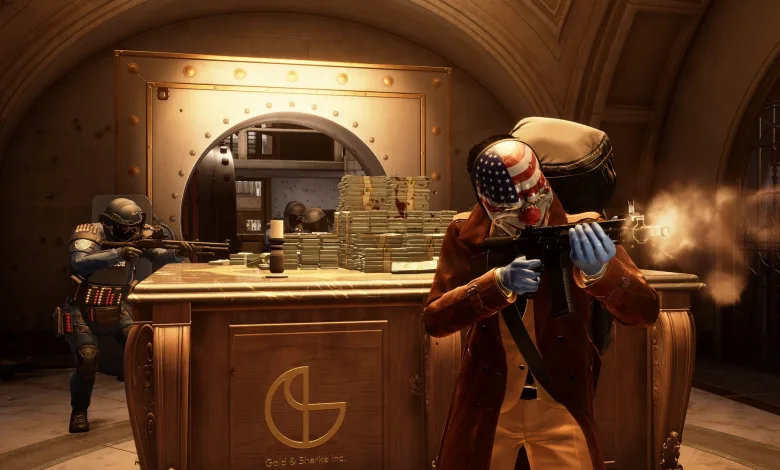
Payday 3 is the much anticipated sequel to one of the most popular co-op shooters ever. Since its release, Payday-players have been reveling in the thrill of a perfectly planned and executed heist. That’s what makes Payday a high-octane, co-op FPS experience without equal. Step out of retirement back into the life of crime in the shoes of the Payday Gang, the envy of their peers and the nightmare of law-enforcement wherever they go. Several years after the crew’s reign of terror over Washington DC has ended, they assemble once again to deal with the threat that roused them out of early retirement.
- Genre: Shooter
- Platforms: Xbox Series X|S, PC (Microsoft Windows), PlayStation 5
- Modes: Single player, Multiplayer, Co-operative
- Release: 2023-09-21
- Publisher: Prime Matter, PLAION
-
Age Rating:


 CERO Z / CLASS_IND 18 / USK 18 / ESRB M / ACB MA 15+ / PEGI 18 / GRAC 19+
- IGDB Rating: 64.6/100