CPG - Console & PC Gaming
  • Home
  • News
  • PC
  • PS5
  • Xbox
  • Switch
  • Mobile
  • Reviews
  • Esports
  • Guides
    • Lost Ark
    • Gray Zone Warfare
      • Artisan
      • Banshee
      • Gunny
      • Handshake
      • Lab Rat
      • Turncoat
    • Escape From Tarkov
      • Jaeger
      • Mechanic
        • Gunsmith
      • Peacekeeper
      • Prapor
      • Ragman
      • Skier
      • Therapist
No Result
View All Result
CPG - Console & PC Gaming
  • Home
  • News
  • PC
  • PS5
  • Xbox
  • Switch
  • Mobile
  • Reviews
  • Esports
  • Guides
    • Lost Ark
    • Gray Zone Warfare
      • Artisan
      • Banshee
      • Gunny
      • Handshake
      • Lab Rat
      • Turncoat
    • Escape From Tarkov
      • Jaeger
      • Mechanic
        • Gunsmith
      • Peacekeeper
      • Prapor
      • Ragman
      • Skier
      • Therapist
CPG - Console & PC Gaming
No Result
View All Result
Home Guides

Battlefield V Open Beta How to Fix Squad Issues

Angel Kicevski by Angel Kicevski
September 7, 2018 - Updated on November 28, 2025
in Guides, News
0

Playing Battlefield V may be quite triggering during this Open Beta, especially if you are playing with friends. Well, I had the chance to make a premade squad yesterday and found out that making a group and starting a match can lead to various crashes.

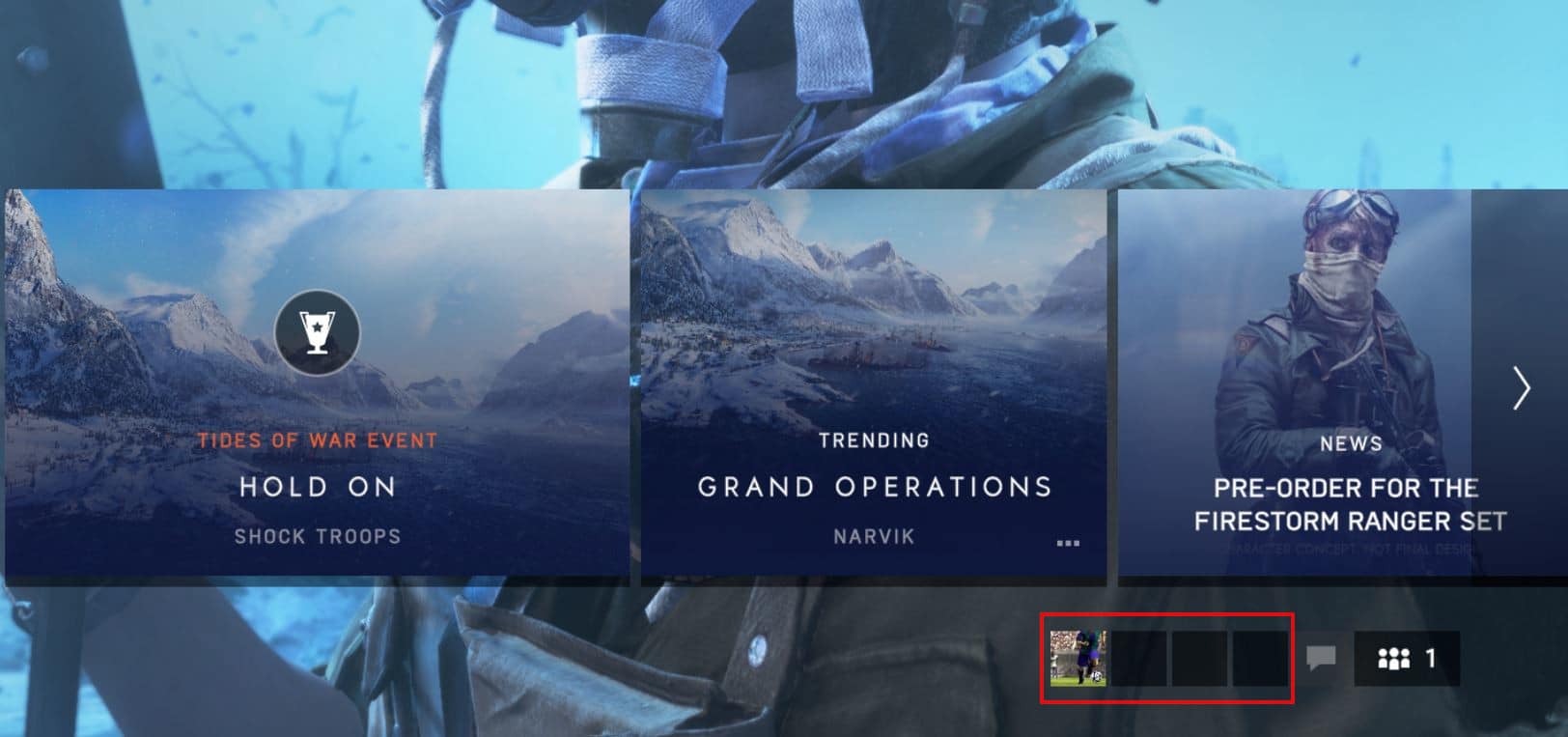
Dealing with the problem is not a biggie, but it definitely consumed a little bit of time. When you’re creating a group, you should notice your bottom right corner if the players are being added. Usually, the leader of the group always sees them. However, the newly added players do not.

That actually pinpoints the problem, meaning not all of the players are actually in the squad, so when the leader of the squad starts the queue up it happens to throw the rest of the players outside of the match. See pic below to get the picture easier.

Battlefield V Premade Squad Join Fix

With that being said, all you need to do is just pass the lead to the player you have invited by promoting him. In that way, he will begin to see the players in the bottom right corner. All you need to do is just continue with the same pattern by passing the lead to the newly joined players.

After you do that, all of the players have to see each other both on the left side of the screen under Social and on the right bottom on the little icons before you start a match. See pic below:
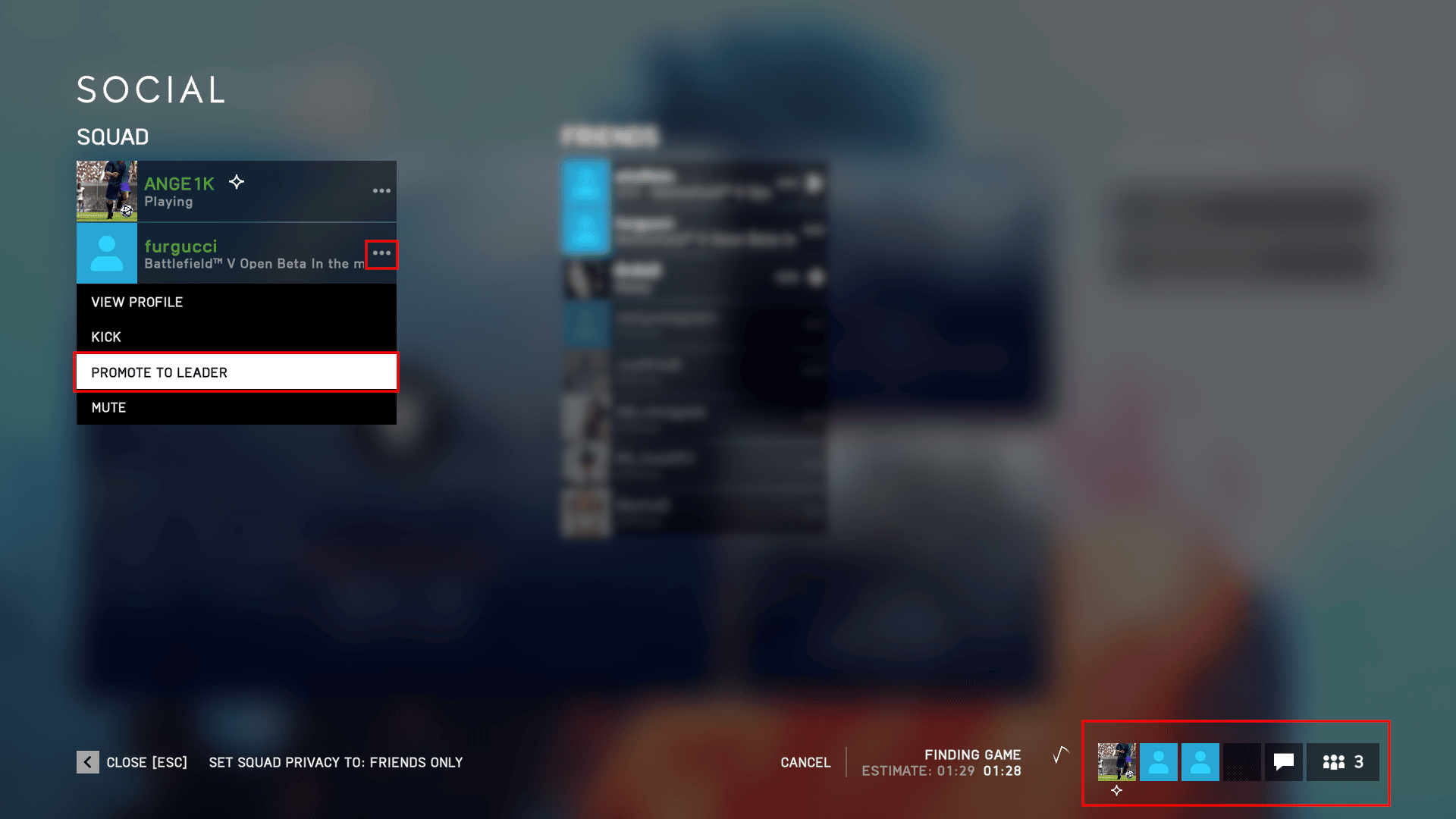
Before you begin a match, just make sure you can all see each other in the bottom right corner. If so, it doesn’t matter who is the leader, just make sure he would be the one starting the queue. Also, do not forget to tell us if this little workaround fixed your issues in the comments below.

Tags: Battlefield VEA Dice
ShareTweet
Previous Post

The Way to a Guaranteed Lucky Pokemon in Pokemon GO

Next Post

The First Call of Duty’s Blackout Battle Royale Trailer Showcases lots of Mechanics

Angel Kicevski

Angel Kicevski

I've spent half of my life playing video games, ever since the competitive 1.6 era. Now I am happily married to Margarita Kicevski, and have two beautiful children. My goal is to deliver fresh news and updates, but most of the time I want to work on guides. Since I have rebooted this website, I am planning on making it huge. Just you wait!

RELATEDPOSTS

Credits: EA Dice
Guides

Here’s my favorite KTS100 MK8 loadout guide for Battlefield 6

February 20, 2026
Patch Notes

Battlefield 6 update 1.1.3.6 lands February 3 with stability and Eastwood fixes

January 30, 2026
News

Battlefield outsold Call of Duty in the US in 2025 as Black Ops 7 finishes fifth

January 22, 2026
News

Leaked Battlefield 6 Season 2 trailer names Hagental Airbase and shows new weapons

January 21, 2026
News

You can now change your Battlefield 6 crosshair color in Settings

January 20, 2026
News

Battlefield 6 patch 1.1.3.5 improves melee response and tones down jet cannons

January 16, 2026

Leave a Reply Cancel reply

Your email address will not be published. Required fields are marked *

Upcoming Games

  1. Sand Seeker

    Sand Seeker

    Releases March 14, 2026 in 1 hr 34 min

    Nintendo Switch

  2. Dyrocraft 2: Reborn

    Dyrocraft 2: Reborn

    Releases March 14, 2026 in 1 hr 34 min

    PC (Microsoft Windows)

  3. Coin Pit

    Coin Pit

    Releases March 14, 2026 in 1 hr 34 min

    Nintendo Switch

  4. Cup Heroes: Champion's Starter Pack

    Releases March 14, 2026 in 1 hr 34 min

    Nintendo Switch

  5. Altiros

    Altiros

    Releases March 15, 2026 in 2 days

    PC (Microsoft Windows)

View full release calendar →

CPGPATCH NOTES

Patch Notes

Delta Force’s March update adds a free M249 skin and the Death Rose lucky draw

by Angel Kicevski
March 12, 2026
Patch Notes

Apex Legends patch fixes Epyon’s Lash crash, Gundam badge art, and Firing Range announcer

by Angel Kicevski
March 11, 2026
News

Midnight hotfixes (March 11, 2026): Guardian Druid fixes, Sundering Roar tuning and dungeon adjustments

by Angel Kicevski
March 11, 2026

About Us

We are CPG - Console & PC Gaming, an independent, family-run website providing fresh news, updates, reviews, interviews, guides, and other bits and pieces from the gaming industry.

Read more

  • About Us – Our Story
  • Privacy Policy
  • Contact

© 2025 CPG - Console & PC Gaming

Welcome Back!

Login to your account below

Forgotten Password?

Retrieve your password

Please enter your username or email address to reset your password.

Log In
  • Home
  • News
  • PC
  • PS5
  • Xbox
  • Switch
  • Mobile
  • Reviews
  • Esports
  • Guides
    • Lost Ark
    • Gray Zone Warfare
      • Artisan
      • Banshee
      • Gunny
      • Handshake
      • Lab Rat
      • Turncoat
    • Escape From Tarkov
      • Jaeger
      • Mechanic
      • Peacekeeper
      • Prapor
      • Ragman
      • Skier
      • Therapist

© 2025 CPG - Console & PC Gaming