NVIDIA released GeForce hotfix driver 621.35 on Nov. 20 to address excessive background writes associated with driver 621.24. If Task Manager shows gigabytes of writes from NVDisplay.Container.exe, 621.35 is the targeted fix. NVIDIA describes the optional hotfix as a beta driver that received abbreviated quality testing.
The issue followed the Nov. 12 release of 621.24, with user reports appearing by Nov. 15. A GeForce forum complaint describes continuous writes to an NVIDIA-related file. Reports cited about 30 GB per hour and 70 GB or more over longer sessions. Those figures measure reported write activity, not confirmed SSD damage.


PSA: Nvidia driver 621.14 and up continuously write to ssd at 6-30 GB an hour
byu/ResponsiblePen3082 inpcgaming
To check the write total:
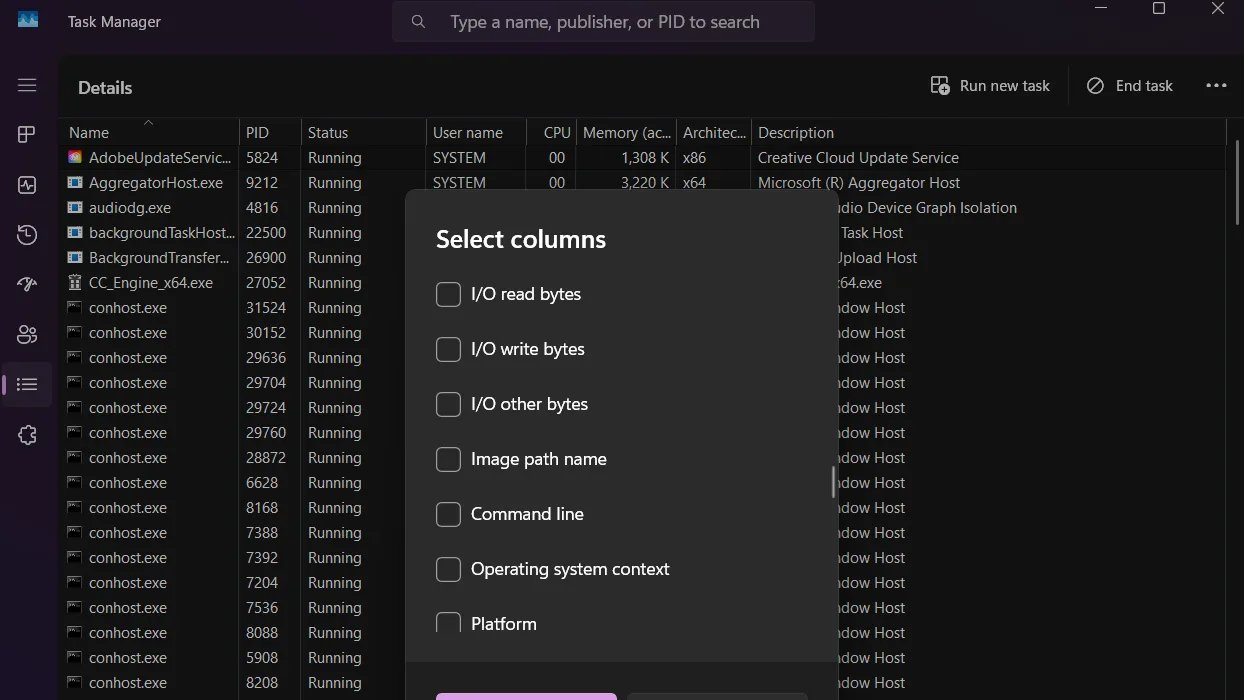
- Open Task Manager and select the Details tab.
- Right-click a column heading and choose Select columns.
- Enable I/O write bytes, then find NVDisplay.Container.exe.
- Note the value, wait a known amount of time, and check it again. Task Manager shows bytes, so compare the difference over an hour to estimate the hourly rate.
A multi-gigabyte increase over an hour while running 621.24 matches the reported behavior. The filename in the forum complaint differs from the one NVIDIA lists in its 621.35 hotfix notice, which identifies the issue as “Excessive writes to file nvlog.nvlgstg may occur in background [7116722].” The notice does not say whether that name and the complaint’s `nvtopps` label refer to the same file. TroubleGrid’s initial investigation traced the activity to a binary log at C:\ProgramData\NVIDIA Corporation\nvtopps\nct\nvlog.nvlgstg, which it said was repeatedly rewritten rather than appended. Read TroubleGrid’s investigation.
If 621.24 is producing the reported write activity, 621.35 is the targeted option. NVIDIA says the hotfix is based on 621.24 and is optional, provided as-is, and tested through a much abbreviated quality-assurance process. NVIDIA plans to include its fixes in the next official driver and take the hotfix down then. If you would rather avoid the beta, you can wait for that release or reinstall GeForce driver 621.01. Choose the clean installation option in NVIDIA’s installer, or use Display Driver Uninstaller before installing the older driver.
There is a tradeoff for some systems. NVIDIA’s 621.14 release fixed video playback that could freeze or show a black screen on some GeForce RTX 50 Series GPUs and RTX Spark systems after installing 621.01. Consider that fix before rolling back.
Have you seen unusually heavy writes on 621.24, and did 621.35 change the total? For updates on NVIDIA’s driver fixes and the changes scheduled for its next full release, follow us on X, Bluesky, YouTube, Instagram, Steam, and Telegram.