CPG - Console & PC Gaming
  • Home
  • News
  • PC
  • PS5
  • Xbox
  • Switch
  • Mobile
  • Reviews
  • Esports
  • Guides
    • Lost Ark
    • Gray Zone Warfare
      • Artisan
      • Banshee
      • Gunny
      • Handshake
      • Lab Rat
      • Turncoat
    • Escape From Tarkov
      • Jaeger
      • Mechanic
        • Gunsmith
      • Peacekeeper
      • Prapor
      • Ragman
      • Skier
      • Therapist
No Result
View All Result
CPG - Console & PC Gaming
  • Home
  • News
  • PC
  • PS5
  • Xbox
  • Switch
  • Mobile
  • Reviews
  • Esports
  • Guides
    • Lost Ark
    • Gray Zone Warfare
      • Artisan
      • Banshee
      • Gunny
      • Handshake
      • Lab Rat
      • Turncoat
    • Escape From Tarkov
      • Jaeger
      • Mechanic
        • Gunsmith
      • Peacekeeper
      • Prapor
      • Ragman
      • Skier
      • Therapist
CPG - Console & PC Gaming
No Result
View All Result
Home Guides Escape From Tarkov

How to activate the VoIP feature in Escape From Tarkov?

Angel Kicevski by Angel Kicevski
December 12, 2021
in Escape From Tarkov, News
0

I have to say, Escape From Tarkov’s latest update has been a fresh experience so far, even if the character movement feels like his legs are tied due to the new player inertia. However, as compensation for it, the new VoIP feature is different and feels very real. So, “clunky movement” meets “fancy talk.” Have you wanted to try the new VoIP but don’t know how? Worry not. We’ll guide you through its activation, as it is super easy to do.

How To Activate Escape From Tarkov VoIP

If you don’t know how to activate Escape From Tarkov’s VoIP feature, then this is what you should do.


  1. Go to in-game options
  2. Go to the Sound tab
  3. Check the Enable VoIP (Check Image Below)
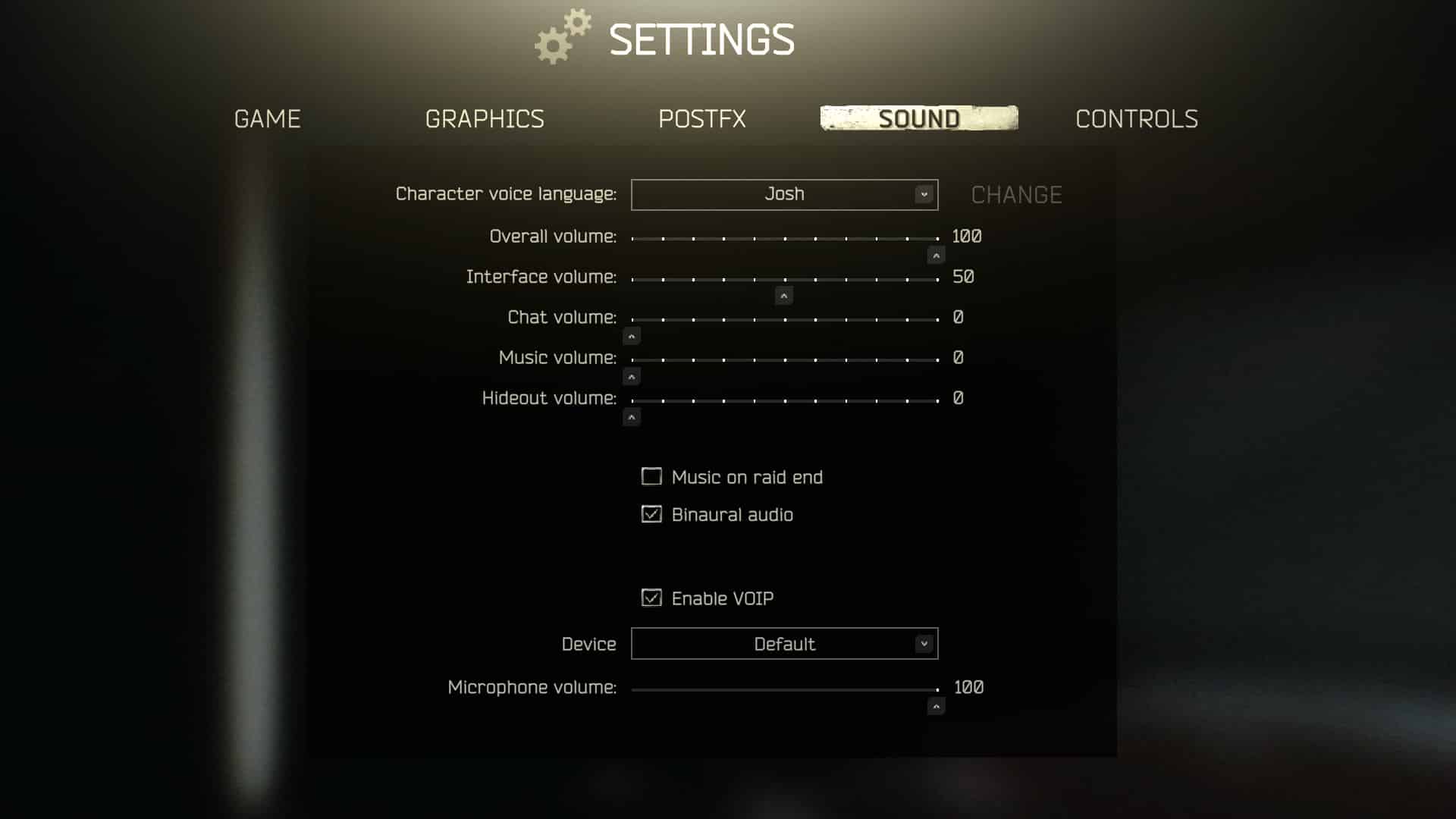
Once you activate the VoIP feature by doing that, the game would throw you the following message:

“With VoIP enabled, you can have a completely different gaming experience. This functionality is designed for coordination and the ability to negotiate. 

Remember that using VoIP inappropriately can ruin the experience for you and other players.

Insults, Playing music, clogging the air, and other improper behavior when using VoIP can lead to both the blocking of its functionality and the banning of the game account.”

I’d recommend you restart the game just in case because it’s Tarkov.

The second important part is to go to your keybinds settings:

  1. Go to in-game settings
  2. Controls
  3. Then check for your Push-To-Talk keybinds – Default is “K.”

Notice just above it you have an unbound button to disable the VoIP feature altogether, so you don’t hear “idiocracy” in-game if any occur.

If you want to learn how to report players for inappropriate VoIP conduct, make sure you check this guide.


Tags: Battlestate GamesEscape From Tarkov
ShareTweet
Previous Post

Escape From Tarkov 0.12.12 Official Patch Notes Revealed

Next Post

Escape From Tarkov “Debut” Quest Guide

Angel Kicevski

Angel Kicevski

I've spent half of my life playing video games, ever since the competitive 1.6 era. Now I am happily married to Margarita Kicevski, and have two beautiful children. My goal is to deliver fresh news and updates, but most of the time I want to work on guides. Since I have rebooted this website, I am planning on making it huge. Just you wait!

RELATEDPOSTS

News

Escape from Tarkov led new PC releases in 2025, per playtime data

March 12, 2026
News

Battlestate cut raid wait times in Escape from Tarkov

March 1, 2026
News

Active Escape from Tarkov codes and how to redeem them

February 20, 2026
News

Escape from Tarkov roadmap promises unnamed boss and a large in-game event in Q2 2026

February 18, 2026
News

Tarkov Players Push to Add PlaySafe ID to Fight Cheaters

February 1, 2026
Guides

Don’t use Smooth Motion in Escape From Tarkov because it’s actually super bad

January 22, 2026

Leave a Reply Cancel reply

Your email address will not be published. Required fields are marked *

Upcoming Games

  1. Altiros

    Altiros

    Releases March 15, 2026 in 19 hr 46 min

    PC (Microsoft Windows)

  2. Keplerian Space Discovery

    Keplerian Space Discovery

    Releases March 15, 2026 in 19 hr 46 min

    PC (Microsoft Windows)

  3. Giant’s Heart

    Giant’s Heart

    Releases March 15, 2026 in 19 hr 46 min

    PC (Microsoft Windows)

  4. Friendslop Drive

    Friendslop Drive

    Releases March 15, 2026 in 19 hr 46 min

    PC (Microsoft Windows)

  5. Wizard Punks!!!

    Wizard Punks!!!

    Releases March 15, 2026 in 19 hr 46 min

    PC (Microsoft Windows), Mac

View full release calendar →

CPGPATCH NOTES

Patch Notes

Delta Force’s March update adds a free M249 skin and the Death Rose lucky draw

by Angel Kicevski
March 12, 2026
Patch Notes

Apex Legends patch fixes Epyon’s Lash crash, Gundam badge art, and Firing Range announcer

by Angel Kicevski
March 11, 2026
News

Midnight hotfixes (March 11, 2026): Guardian Druid fixes, Sundering Roar tuning and dungeon adjustments

by Angel Kicevski
March 11, 2026

About Us

We are CPG - Console & PC Gaming, an independent, family-run website providing fresh news, updates, reviews, interviews, guides, and other bits and pieces from the gaming industry.

Read more

  • About Us – Our Story
  • Privacy Policy
  • Contact

© 2025 CPG - Console & PC Gaming

Welcome Back!

Login to your account below

Forgotten Password?

Retrieve your password

Please enter your username or email address to reset your password.

Log In
  • Home
  • News
  • PC
  • PS5
  • Xbox
  • Switch
  • Mobile
  • Reviews
  • Esports
  • Guides
    • Lost Ark
    • Gray Zone Warfare
      • Artisan
      • Banshee
      • Gunny
      • Handshake
      • Lab Rat
      • Turncoat
    • Escape From Tarkov
      • Jaeger
      • Mechanic
      • Peacekeeper
      • Prapor
      • Ragman
      • Skier
      • Therapist

© 2025 CPG - Console & PC Gaming