CPG - Console & PC Gaming
  • Home
  • News
  • PC
  • PS5
  • Xbox
  • Switch
  • Mobile
  • Reviews
  • Esports
  • Guides
    • Lost Ark
    • Gray Zone Warfare
      • Artisan
      • Banshee
      • Gunny
      • Handshake
      • Lab Rat
      • Turncoat
    • Escape From Tarkov
      • Jaeger
      • Mechanic
        • Gunsmith
      • Peacekeeper
      • Prapor
      • Ragman
      • Skier
      • Therapist
No Result
View All Result
CPG - Console & PC Gaming
  • Home
  • News
  • PC
  • PS5
  • Xbox
  • Switch
  • Mobile
  • Reviews
  • Esports
  • Guides
    • Lost Ark
    • Gray Zone Warfare
      • Artisan
      • Banshee
      • Gunny
      • Handshake
      • Lab Rat
      • Turncoat
    • Escape From Tarkov
      • Jaeger
      • Mechanic
        • Gunsmith
      • Peacekeeper
      • Prapor
      • Ragman
      • Skier
      • Therapist
CPG - Console & PC Gaming
No Result
View All Result
Home News

DOOM: The Dark Ages Preload and File Size Details You Need to Know

Get ready for DOOM: The Dark Ages with preload timing and file size info across platforms.

Mihaela Kicevski by Mihaela Kicevski
May 9, 2025
in News, PC, PS5, Xbox
0

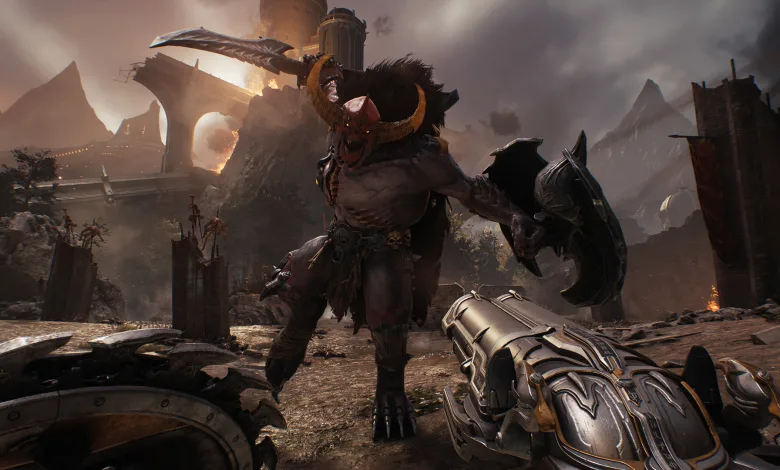
DOOM: The Dark Ages is almost here, and if you want to jump in the second it drops, knowing when and how to preload the game is key. Plus, the file size is pretty hefty, so clearing space ahead of time will save you from last-minute panic. Let’s break down what you need to know to prepare for the Doomslayer’s return.

When Can You Preload DOOM: The Dark Ages?

You can preload DOOM: The Dark Ages 24 hours before launch. The exact launch time depends on your region, so watch your platform’s store. Xbox users have already spotted the preload option appearing in the final day before release, and PlayStation and PC will likely follow the same pattern.


Check out this tweet from X user Pizza Pit showing the Xbox preload screen:

YOU CAN PRE-INSTALL THE NEW DOOM GAME !!! pic.twitter.com/LzWNdYxE0F

— Pizza Pit 🍅 (@Stealth_Creed) May 7, 2025

How to Preload DOOM: The Dark Ages

Preloading requires a digital purchase of the game. Physical copies won’t let you preload since you usually get the disc on release day, and if you get it early, you can just start playing right away.

Here’s the quick rundown for digital preloading:

    1. Pick your platform: PlayStation, Xbox, or PC.
  1. Buy DOOM: The Dark Ages digitally from the platform’s store.
  2. Look for the preload option close to the release date.
  3. Hit download as soon as it’s available.
  4. Once downloaded, you’re will play the moment the game launches.

DOOM: The Dark Ages File Size Explained

The game demands a lot of space. On PS5, it’s about 85 GB, while Xbox and PC versions might need up to 100 GB. X user Corey Cooper shared that the PS5 version clocks in at 84.3 GB.

Even if you buy a physical disc, you’ll still have to download most of the game. Steam and Microsoft Store don’t have exact numbers yet, but expect to clear around 100 GB just to be safe.

One of our lovely Patreon Supporters got their hands on a copy of DOOM: The Dark Ages PS5 early.

Just a 85 MB stub and a blocker to go online and update.

(deleted the previous tweet about this due to hope getting in the way of our basic reading ability ;-)) pic.twitter.com/nMq5VwsR8Y

— Does it play? (@DoesItPlay1) May 9, 2025

Tags: BethesdaDOOM: The Dark Ages
ShareTweet
Previous Post

Once Human Temporarily Pauses Crimson Moon Event to Fix Data Issues

Next Post

Phasmophobia Hotfix v0.12.1.2 Fixes Trophy Display and Other Issues

Mihaela Kicevski

Mihaela Kicevski

I am Angel's and Margarita's daughter, and I am happy to be starting this work together with my parents! I can't wait to see where this takes us!

RELATEDPOSTS

News

Fallout 76 Backwoods update brings Bigfoot and other cryptids to public events

March 3, 2026
News

Bethesda turned down Fallout screen offers for a decade until Todd Howard found the right partner

January 22, 2026
News

Modder turns Todd Howard into lethal immortal snail in Fallout 4

January 14, 2026
News

These Fallout 4 Mods Add 32 New Interiors Across Boston

December 26, 2025
News

Bethesda wants Fallout 5 to be a 600-hour game

December 25, 2025
News

Bethesda says it was scared to make Fallout 3 but was relaxed by Fallout 4

December 20, 2025

Leave a Reply Cancel reply

Your email address will not be published. Required fields are marked *

Upcoming Games

  1. Altiros

    Altiros

    Releases March 15, 2026 in 6 hr 35 min

    PC (Microsoft Windows)

  2. Keplerian Space Discovery

    Keplerian Space Discovery

    Releases March 15, 2026 in 6 hr 35 min

    PC (Microsoft Windows)

  3. Giant’s Heart

    Giant’s Heart

    Releases March 15, 2026 in 6 hr 35 min

    PC (Microsoft Windows)

  4. Friendslop Drive

    Friendslop Drive

    Releases March 15, 2026 in 6 hr 35 min

    PC (Microsoft Windows)

  5. Wizard Punks!!!

    Wizard Punks!!!

    Releases March 15, 2026 in 6 hr 35 min

    PC (Microsoft Windows), Mac

View full release calendar →

CPGPATCH NOTES

Patch Notes

Delta Force’s March update adds a free M249 skin and the Death Rose lucky draw

by Angel Kicevski
March 12, 2026
Patch Notes

Apex Legends patch fixes Epyon’s Lash crash, Gundam badge art, and Firing Range announcer

by Angel Kicevski
March 11, 2026
News

Midnight hotfixes (March 11, 2026): Guardian Druid fixes, Sundering Roar tuning and dungeon adjustments

by Angel Kicevski
March 11, 2026

About Us

We are CPG - Console & PC Gaming, an independent, family-run website providing fresh news, updates, reviews, interviews, guides, and other bits and pieces from the gaming industry.

Read more

  • About Us – Our Story
  • Privacy Policy
  • Contact

© 2025 CPG - Console & PC Gaming

Welcome Back!

Login to your account below

Forgotten Password?

Retrieve your password

Please enter your username or email address to reset your password.

Log In
  • Home
  • News
  • PC
  • PS5
  • Xbox
  • Switch
  • Mobile
  • Reviews
  • Esports
  • Guides
    • Lost Ark
    • Gray Zone Warfare
      • Artisan
      • Banshee
      • Gunny
      • Handshake
      • Lab Rat
      • Turncoat
    • Escape From Tarkov
      • Jaeger
      • Mechanic
      • Peacekeeper
      • Prapor
      • Ragman
      • Skier
      • Therapist

© 2025 CPG - Console & PC Gaming